

9 Best SurveyMonkey Competitors in 2026 (Including an Open-Source Option)

Johannes
Co-Founder @ Formbricks
12 Minutes
August 16th, 2026
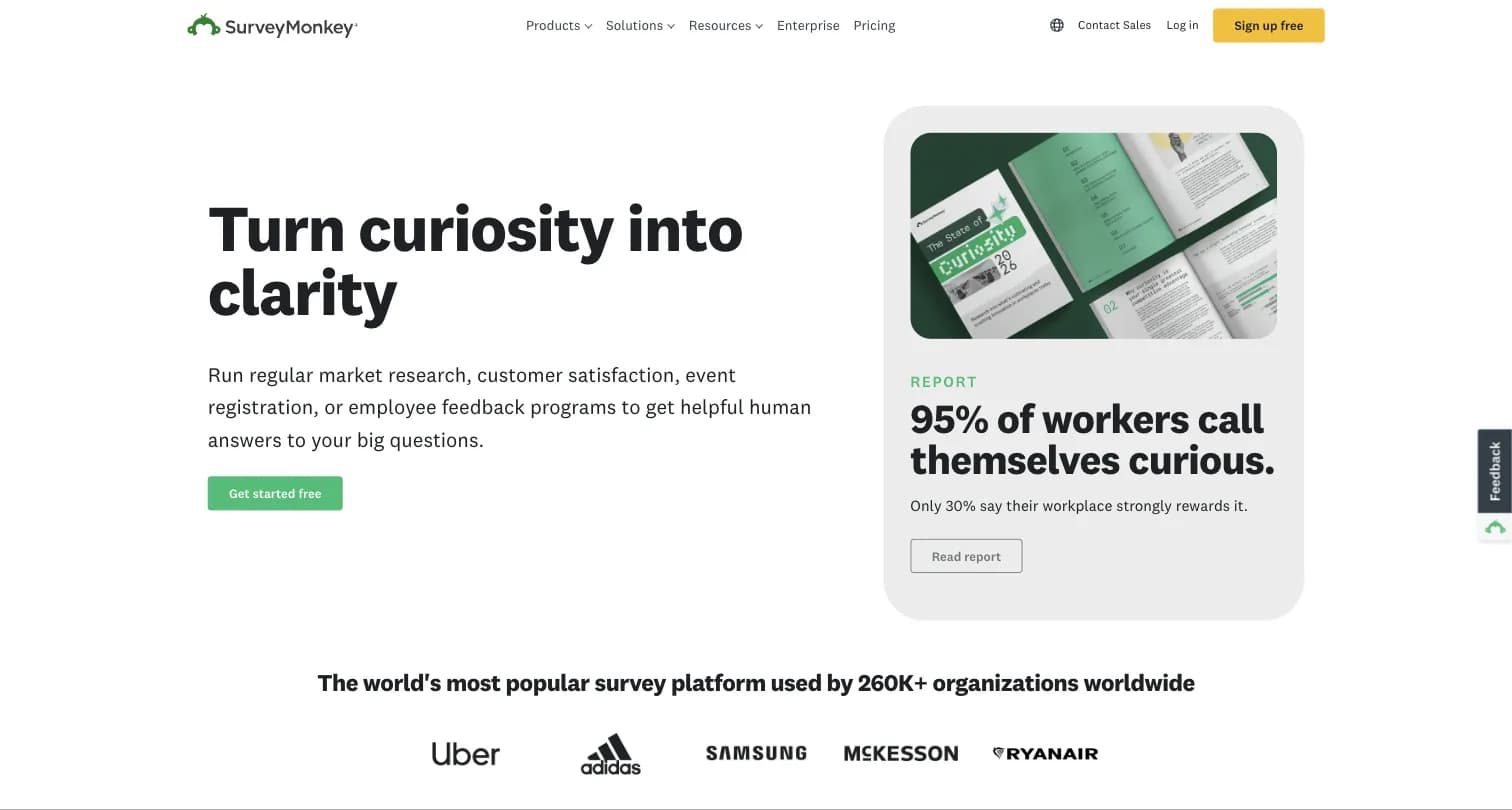
Captured August 15, 2026 from surveymonkey.com.
SurveyMonkey has been the default survey tool since 1999, and it's still used by 260,000+ organizations. But its free plan caps at 10 questions per survey, its Individual-tier pricing is hidden behind account signup, and Team plans force a 3-user minimum. Here are 9 real SurveyMonkey competitors, what each does differently, and one gap most "SurveyMonkey alternatives" roundups skip past.
What Is SurveyMonkey?
SurveyMonkey was founded in 1999 by Ryan Finley, who built it after finding no simple tool available to collect customer feedback; his brother Chris Finley later joined as co-founder. The company relocated to Portland, Oregon in 2005 and now positions itself as "the world's most popular survey platform," used by 260,000+ organizations, ranked #1 on G2 for online forms with 14,000+ five-star reviews per its own marketing.
SurveyMonkey holds a 4.4 rating across 23,901 reviews on G2 and 4.3-4.6 across 5,821-10,486 reviews on Capterra depending on the listing consulted. It offers 500+ templates, SurveyMonkey Audience (a 335M+ person respondent panel), 200+ integrations, and AI-powered survey creation and analysis.
Why Companies Look for SurveyMonkey Competitors
We reviewed SurveyMonkey's own pricing page, third-party competitor roundups (Pollfish, FormGrid), and G2/Capterra review data to understand the patterns behind this search.
1. A Free Plan That's Really a Demo
SurveyMonkey's free Basic plan caps surveys at 10 questions with response viewing limited to roughly 25-40 responses depending on the source, more of a taste test than a usable free tier for real survey work.
2. Hidden Individual-Tier Pricing
Individual plans (Standard, Advantage, Premier) don't show a public dollar price without account signup, and third-party sources disagree on what they actually cost: one blog cites $39/month billed annually, another cites $99/month month-to-month for the same tier.
3. Costs That Escalate Fast
Team plans require a 3-user minimum starting at $30/user/month, plus a $0.15 charge per response over your plan's limit. Pricing is the single most-disliked theme in SurveyMonkey reviews, mentioned in 24.2% of negative sentiment, roughly twice the rate of other survey tools, per Thematic's analysis.
4. A Cluttered, Menu-Heavy Interface
FormGrid's independent review found "many users find SurveyMonkey's dashboard confusing, especially when filtering responses or setting up reports," with a lot of menus, options, and screens to navigate for what should be simple tasks.
5. Limited Design Flexibility
Beyond colors and a logo, SurveyMonkey doesn't give much control over layout, spacing, or overall visual style, per FormGrid's testing, most SurveyMonkey surveys end up looking similar even after customization.
6. Basic Logic Compared to Research-Grade Tools
SurveyMonkey primarily offers skip logic for conditional paths. For more complex branching scenarios, dedicated research platforms go further.
SurveyMonkey Competitors at a Glance
| Competitor | Best For | Free Plan | Starting Price | Open Source |
|---|---|---|---|---|
| Formbricks | Open-source feedback and experience management | Yes (250 responses/mo) | $74/month (billed annually) | Yes |
| Qualtrics | Enterprise research depth and statistical tooling | Yes (500 responses total) | $420/month (self-serve) | No |
| Alchemer | Mid-market VoC without enterprise complexity | Referenced but not shown as a tier | $55/user/month | No |
| SurveySparrow | Conversational, chat-like surveys | Yes (75 responses/quarter) | $19/month | No |
| Google Forms | Free, no-frills internal forms | Yes (unlimited) | $7/user/month (Workspace seat) | No |
| Typeform | Design-led, conversational forms | Yes (limited responses) | $39/month | No |
| Microsoft Forms | Microsoft 365-native surveys and quizzes | Yes (with Microsoft account) | Included with Microsoft 365 | No |
| Zoho Survey | Zoho ecosystem integration on a budget | Yes (100 responses/survey) | $7.42/month | No |
| QuestionPro | Global data residency, market research tooling | Yes (200 responses/survey) | $99/user/month | No |
Top 9 SurveyMonkey Competitors in 2026
1. Formbricks: The Open-Source Pick for Transparent Pricing and Self-Hosting
If the reason you're evaluating SurveyMonkey competitors is its hidden Individual-tier pricing, its 3-user Team minimum, or a data residency requirement, Formbricks is built specifically for that gap.
Why it stands out as a SurveyMonkey competitor:
Formbricks is an open-source feedback and experience management suite built around three pillars: feedback management (website, in-app, link, and email surveys unified on one platform), feedback analytics (response dashboards, drop-off tracking, and segmentation), and workflows and integrations (Formbricks Workflows for post-response automation, plus native integrations to Salesforce, HubSpot, Slack, Google Sheets, and Notion, all through a free API on every tier).
Key features:
- Multi-channel surveys: link surveys, website pop-ups, in-app micro-surveys, and email-embedded surveys on one platform
- Attribute-based targeting: show surveys to specific segments based on behavior, attributes, or customer journey stage
- Feedback analytics: aggregate and per-response views, drop-off tracking, and custom segmentation
- Formbricks Workflows: automate what happens after a response comes in, without a separate case-management product
- Open API and webhooks on every tier, unlike SurveyMonkey where deeper integration work sits behind higher tiers
- iOS and Android SDKs for native mobile in-app surveys
- Self-hosting option, a capability SurveyMonkey doesn't offer at any price
Pricing (Cloud):
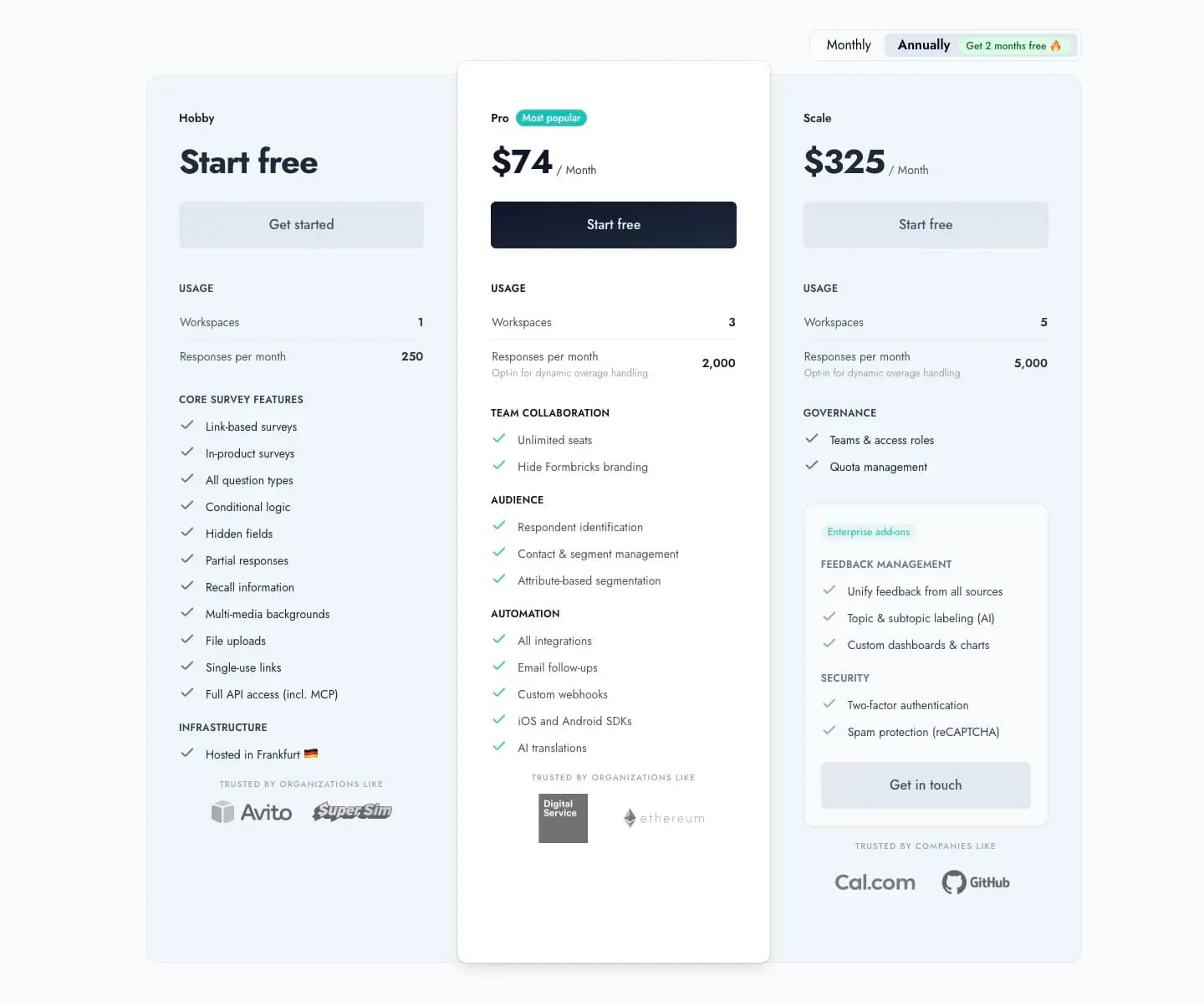
Captured August 16, 2026 from formbricks.com/pricing.
- Hobby (Free): 250 responses/month, 1 workspace, full API access (including MCP), hosted in Frankfurt
- Pro: $89/month billed monthly, or $74/month billed annually ($890/year) for 3 workspaces and 2,000 responses/month, unlimited seats
- Scale: $390/month billed monthly, or $325/month billed annually ($3,900/year) for 5 workspaces and 5,000 responses/month, teams and access roles
Pricing (Self-Hosted):
- Community Edition: Free forever, AGPLv3, unlimited surveys and seats
- Enterprise Edition: Custom pricing for SSO, branding removal, and white-glove onboarding
Best for: Teams that hit SurveyMonkey's hidden Individual pricing or 3-user Team minimum, and organizations with data residency requirements that self-hosting solves directly.
2. Qualtrics: Enterprise Research Depth
Qualtrics is the platform SurveyMonkey itself benchmarks against on its own comparison pages, claiming to deliver "95% of the same survey features as Qualtrics, without the complexity and cost."
How it compares to SurveyMonkey: Qualtrics splits into three separately-priced product lines (Customer Experience, Employee Experience, Strategy & Research), seven of eight tiers entirely quote-based. Its one public price, Strategic Research (self-serve) at $420/month ($5,040/year), includes StatsIQ statistical tooling (regression, clustering, R-integration) and 20+ guided research methodologies that go well beyond SurveyMonkey's statistical significance testing.
Key features:
- StatsIQ statistical suite and 20+ guided academic-style research solutions
- FedRAMP High, HITRUST, ISO 27001, and ISO 42001 certifications
- 23 question types including video and audio responses
Pricing: Qualtrics Surveys free account (1 user, 500 total responses, 8 question types). Strategic Research (self-serve) at $420/month ($5,040/year, 1,000 responses total). Every other product line is Request Pricing.
Best for: Research teams that need academic-grade statistical tooling and can absorb a quote-based enterprise contract.
3. Alchemer: The Mid-Market Middle Ground
Alchemer (formerly SurveyGizmo) positions itself between SurveyMonkey's simplicity and Qualtrics' enterprise complexity, marketed explicitly as "enterprise power without the enterprise price tag."
How it compares to SurveyMonkey: Alchemer publishes exact self-serve prices for its named tiers, a real transparency advantage in some respects, but caps Professional and Full Access at 3 users, forcing a custom Business Platform quote for a 4th person. G2 reviewers report steep price increases (one described a jump from under $1,000 to nearly $8,000) and support that can go unanswered for months.
Key features:
- Advanced survey logic with branching, piping, and quotas
- 25-52 question types depending on tier, including MaxDiff and conjoint analysis
- Omnichannel feedback via COMPASS (reviews, social, location listings)
- SOC 2 compliant, GDPR-ready, HIPAA-capable via signed BAA
Pricing: Collaborator at $55/user/month ($315/year), Professional at $165/user/month (max 3 users), Full Access at $275/user/month (max 3 users), Business Platform custom. A free plan is referenced in Alchemer's pricing FAQ but not shown as a distinct tier.
Best for: Small teams (up to 3 users) that need omnichannel VoC (surveys plus reviews, social, location) without Qualtrics-level cost.
4. SurveySparrow: The Conversational Survey Alternative
SurveySparrow's chat-like, one-question-at-a-time interface claims up to 40% higher completion rates than traditional form-style surveys like SurveyMonkey's.
How it compares to SurveyMonkey: Where SurveyMonkey uses a traditional dense form layout, SurveySparrow's conversational format is built specifically for engagement and completion rate. It also bundles 360-degree assessments and reputation management across 100+ review platforms, capabilities SurveyMonkey doesn't offer natively.
Key features:
- Conversational, chat-like survey interface
- 360-degree assessments and reputation management
- Offline survey collection via mobile app
- AI-powered CogniVue text analytics for sentiment and theme extraction
Pricing: Forever-free plan (75 responses/quarter) plus a 14-day trial. Basic at $19/month, Starter at $39/month, Business and Enterprise both quote-based, billed quarterly or yearly (no monthly option).
Best for: HR and CX teams that want higher completion rates through conversational engagement rather than SurveyMonkey's research-grade logic.
5. Google Forms: The Free, No-Frills Option
For teams whose actual need is a simple internal form rather than SurveyMonkey's full feature set, Google Forms is the free default with no response caps at all.
How it compares to SurveyMonkey: Google Forms has no branding, payments, advanced logic, or CX program layer, it competes purely on being free and simple. Where SurveyMonkey's free plan caps at 10 questions and roughly 100 responses, Google Forms has no response limit whatsoever, at the cost of far fewer features.
Key features:
- Unlimited forms and responses on any Google account
- Real-time automated charts, exportable to Google Sheets
- Multiple question types with drag-and-drop organization
Pricing: Free with any Google account. Google Workspace (which bundles Forms with email, storage, and every other Workspace app) starts at $7/user/month for Business Starter; there's no standalone Forms price.
Best for: Teams that already pay for Google Workspace and need a free, no-frills internal survey or RSVP form.
6. Typeform: The Design-Led Alternative
Typeform's one-question-at-a-time conversational format is widely credited with higher completion rates for shorter, marketing-facing forms than SurveyMonkey's traditional layout.
How it compares to SurveyMonkey: SurveyMonkey's own comparison page against Typeform lists advanced branching logic, premium question types, crosstab reports, and a respondent panel as capabilities Typeform doesn't match. Typeform's counter-strength is visual polish: rich media on every question, smooth transitions, and AI-generated forms from a plain-language prompt.
Key features:
- One-question-at-a-time conversational flow with rich media support
- AI-powered form creation (Typeform AI)
- Drop-off rate analytics and conversion tracking (Business tier)
Pricing: Free (limited monthly responses), Basic at $39/month (100 responses/month), Plus at $79/month (1,000 responses/month), Business at $129/month (10,000 responses/month), Enterprise custom.
Best for: Marketing and lead-gen teams where visual design and completion rate matter more than research depth.
7. Microsoft Forms: The Microsoft 365-Native Option
For organizations already standardized on Microsoft 365, Microsoft Forms is the closest built-in equivalent to Google Forms, bundled into the same subscription.
How it compares to SurveyMonkey: Microsoft Forms includes built-in AI and smart recommendations, seamless integration with Excel and other Microsoft 365 tools, and automatically generated reports, all at no additional cost beyond an existing Microsoft 365 subscription. Per Pollfish's roundup of real Capterra reviews, users specifically cite the Excel integration for making "data collection and analysis very convenient" and note it "works smoothly across devices."
Key features:
- Surveys, polls, and quizzes with built-in AI recommendations
- Native Excel and Microsoft 365 integration
- Automatically generated data visualizations and reports
Pricing: Included with a Microsoft 365 subscription; no standalone Forms price is published separately.
Best for: Organizations already paying for Microsoft 365 that want surveys integrated directly with Excel and Teams.
8. Zoho Survey: The Budget Pick for Zoho Ecosystem Teams
Zoho Survey undercuts SurveyMonkey on price at every tier while offering deep native integration with Zoho CRM, Desk, and Analytics.
How it compares to SurveyMonkey: Zoho Survey's Basic tier costs $7.42/month, a fraction of SurveyMonkey's per-seat Team pricing, though every tier below Enterprise ($75/month) is capped at 1 user, versus SurveyMonkey's 3-user Team minimum. Reviewers cite the ability to route survey responses automatically into Zoho CRM records, unlike SurveyMonkey's more generic 200+ integrations.
Key features:
- Deep native Zoho CRM, Desk, and Analytics integration
- 30+ question types, 250+ templates, offline mobile data collection
- Sentiment analysis, cross-tab and trend reports
Pricing: Free (1 user, 100 responses/survey), Basic at $7.42/month ($89/year), Plus at $25/month, Pro at $35/month, Enterprise at $75/month (3 users, SSO, white-label).
Best for: SMBs already invested in the Zoho ecosystem that want survey data flowing directly into CRM records.
9. QuestionPro: Global Data Residency at a Lower Entry Cost
QuestionPro offers a more usable free tier than SurveyMonkey and operates 8 regional data centers for teams with data residency needs.
How it compares to SurveyMonkey: QuestionPro's free Essentials plan allows 200 responses per survey, versus SurveyMonkey's 10-question, roughly-100-response cap. Capterra's independent Fit Score comparison rates QuestionPro slightly ahead of SurveyMonkey on Survey Builder (4.8 vs 4.6), Reporting/Analytics (4.7 vs 4.4), and Question Branching (4.7 vs 4.3).
Key features:
- QuestionPro AI: instant dashboards, open-end summarization, VideoAI sentiment analysis
- 8 regional data centers for data residency needs
- Research Suite: communities, 22M+ respondent panel, advanced methodologies
Pricing: Essentials free (1 user, 200 responses/survey, 30 question types). Advanced at $99/user/month (25,000 responses/year). Team Edition at $83/user/month (5+ users, 100,000 responses/year). Research Suite custom.
Best for: Budget-conscious teams that want a more generous free tier and global data center choice without Qualtrics-level pricing.
SurveyMonkey vs Google Forms: The Head-to-Head Buyers Actually Ask About
Among the competitors above, Google Forms is the one most often searched directly against SurveyMonkey, since it's the free default for anyone already inside Google Workspace.
| Factor | SurveyMonkey | Google Forms |
|---|---|---|
| Price | Free (10 questions), $30-92/user/mo Team plans | Free with any Google account |
| Response limit | 10 questions/survey free; caps by tier above that | None |
| Question types | 20+ (paid tiers) | 11-12 |
| Branding | Requires a paid plan | Logo and background only, free |
| Analytics depth | Statistical significance, crosstabs, benchmarking | Basic charts, exportable to Sheets |
| Best for | Structured research and market surveys | Free, internal, low-stakes forms |
The short version: choose Google Forms if your budget is zero and your needs are basic. Choose SurveyMonkey if you need real research capability and are willing to pay for it. See our full SurveyMonkey vs Google Forms comparison for the complete breakdown.
The Self-Hosting Gap Most Competitor Guides Skip
Every "SurveyMonkey alternatives" and "SurveyMonkey competitors" roundup we reviewed for this guide, including Pollfish's and FormGrid's, evaluates platforms on pricing, templates, and free-tier generosity. Few of them ask a data residency question directly: can you deploy this on your own infrastructure?
Across the 8 competitors above, only Formbricks publishes a self-hosted, open-source deployment path. Qualtrics' own security documentation describes only centrally-hosted cloud infrastructure. Alchemer, SurveySparrow, Google Forms, Typeform, Microsoft Forms, Zoho Survey, and QuestionPro (beyond its regional data centers) are all cloud-only as far as their public documentation shows.
This matters most for organizations in banking, healthcare, government, or any sector where a compliance or data residency mandate rules out third-party SaaS hosting entirely. If that's your actual constraint, the real comparison isn't SurveyMonkey vs. Qualtrics vs. Typeform, it's whether self-hosting is on the table at all.
How to Choose the Right SurveyMonkey Competitor
Picking the right platform depends on which part of SurveyMonkey's limitations you're actually trying to solve.
Start With Your Use Case
- Transparent pricing and self-hosting: Formbricks
- Enterprise research and statistical depth: Qualtrics
- Mid-market VoC without enterprise complexity: Alchemer
- Conversational, engagement-first surveys: SurveySparrow
- Free, no-frills internal forms: Google Forms
- Design-led, conversational marketing forms: Typeform
- Already standardized on Microsoft 365: Microsoft Forms
- Zoho ecosystem integration on a budget: Zoho Survey
- Global data residency, market research tooling: QuestionPro
Then Evaluate These Criteria
| Criteria | Questions to Ask |
|---|---|
| Pricing transparency | Can you get a real number without a sales call or account signup? |
| Free-tier usability | Is the free plan a real tool or a demo capped at 10 questions? |
| Data residency | Where does your feedback data live? Can you self-host if compliance requires it? |
| Scope match | Do you need academic-grade research tooling, or lightweight ongoing feedback collection? |
| Integration depth | Does it connect natively to your CRM, helpdesk, and existing tech stack? |
For related reading, see our SurveyMonkey vs Google Forms, SurveyMonkey vs Typeform, and QuestionPro vs SurveyMonkey comparisons.
Frequently Asked Questions
If your evaluation of SurveyMonkey (or any of the 8 competitors above) comes down to transparent pricing and the option to self-host, Formbricks gives you feedback management, feedback analytics, and workflows on one platform, with a free tier and no hidden Individual-tier pricing.
Try Formbricks now