

What you will build
A trivia quiz that adds a point per correct answer and finishes on a pass or a fail card.1. Create the questions
Open Surveys, click New Survey and choose Start from scratch. Leave the type as Link survey. Add one select-single question per quiz question, each with one correct choice among the options.2. Add a score variable
Scroll to the Embedded Data card below the question list, choose Add field then Create new field, set the source to Calculated and the type to Number, name itscore and give it a default of 0.
3. Add a point per correct answer
This is the part the old version of this page got wrong, so it is worth being precise: conditional logic belongs to a block, not to a question. Scroll to the foot of the block, under the question list, and you will find Conditional Logic and anAdd logic + button.
Add one rule per question:
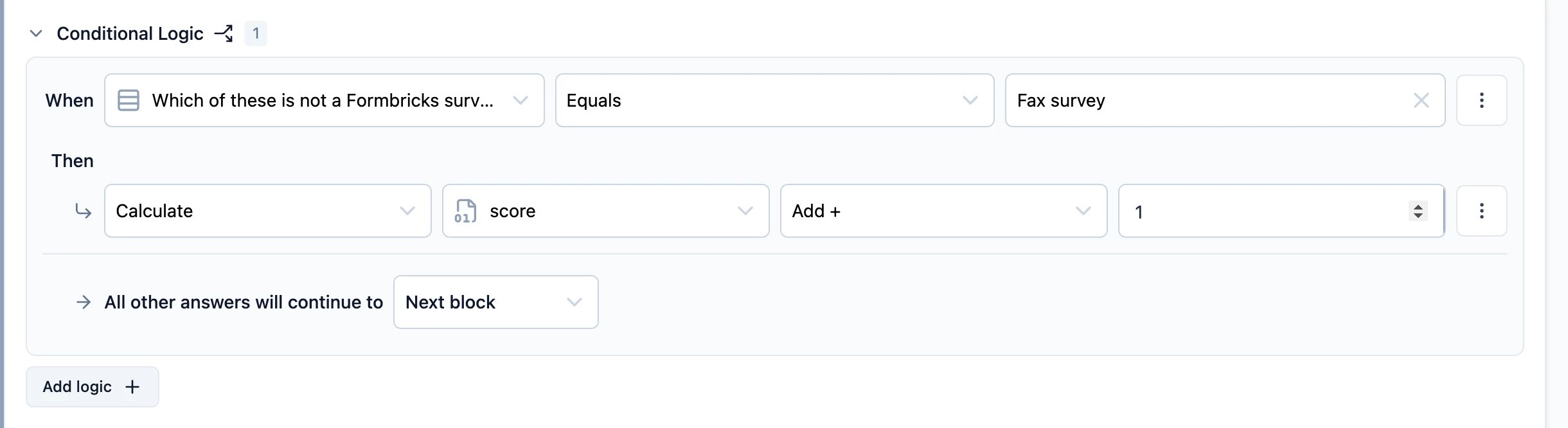
score Add + 1.
A
Calculate action can add, subtract, multiply, divide or assign. A quiz normally wants Add + on a
number variable — see Conditional Logic for the full set of
conditions and actions.4. Show the score and branch on it
Add two endings — a fail card and a pass card. In either card’s text, type@ to recall the score, exactly as you would recall an answer. See Recall Data.
Then add a final rule that routes on the total: when score is greater than or equal to your pass mark, then jump to the pass ending.