

Creatives are part of the Formbricks Enterprise Edition, on self-hosted
instances whose license includes Creatives. They are not available on Formbricks Cloud.
- It is Active: published, inside its schedule, and, if it opens a survey, that survey is active. A creative that opens a link, or a banner without a button, doesn’t depend on any survey.
- Show on matches: it’s a page view, or one of its actions fired on this page.
- Its Show when conditions match this page, visit and device.
- The visitor is in its Share of visitors.
- The visitor’s language doesn’t hide it (see Languages).
- For a banner: the visitor hasn’t closed it in this tab.
Show on
- Every page view (the default): the creative shows on every page where its other settings match. This is the right choice for an always-on feedback button or a site-wide notice.
- When an action fires: pick one or more of the workspace’s actions, for example a click on “Download statement” or exit intent. The creative appears on the page where one of them fired and goes away on the next page view, a route change in a single-page app included. A change to only the query string or the
#hashisn’t a new page view.
Show when
Show when limits the creative to the pages, visits and devices that match, for example “not on/checkout, after two pages, not on phones”. Leave it empty to show the creative everywhere.
It uses exactly the same conditions as website surveys: Current URL, Query parameter, Page referrer, Entry referrer, Visited URL, Pages viewed, Unique pages viewed, Time on site, Device, Browser and Window width, combined with all or any and in groups. See Show Conditions for every condition and how URLs are matched.
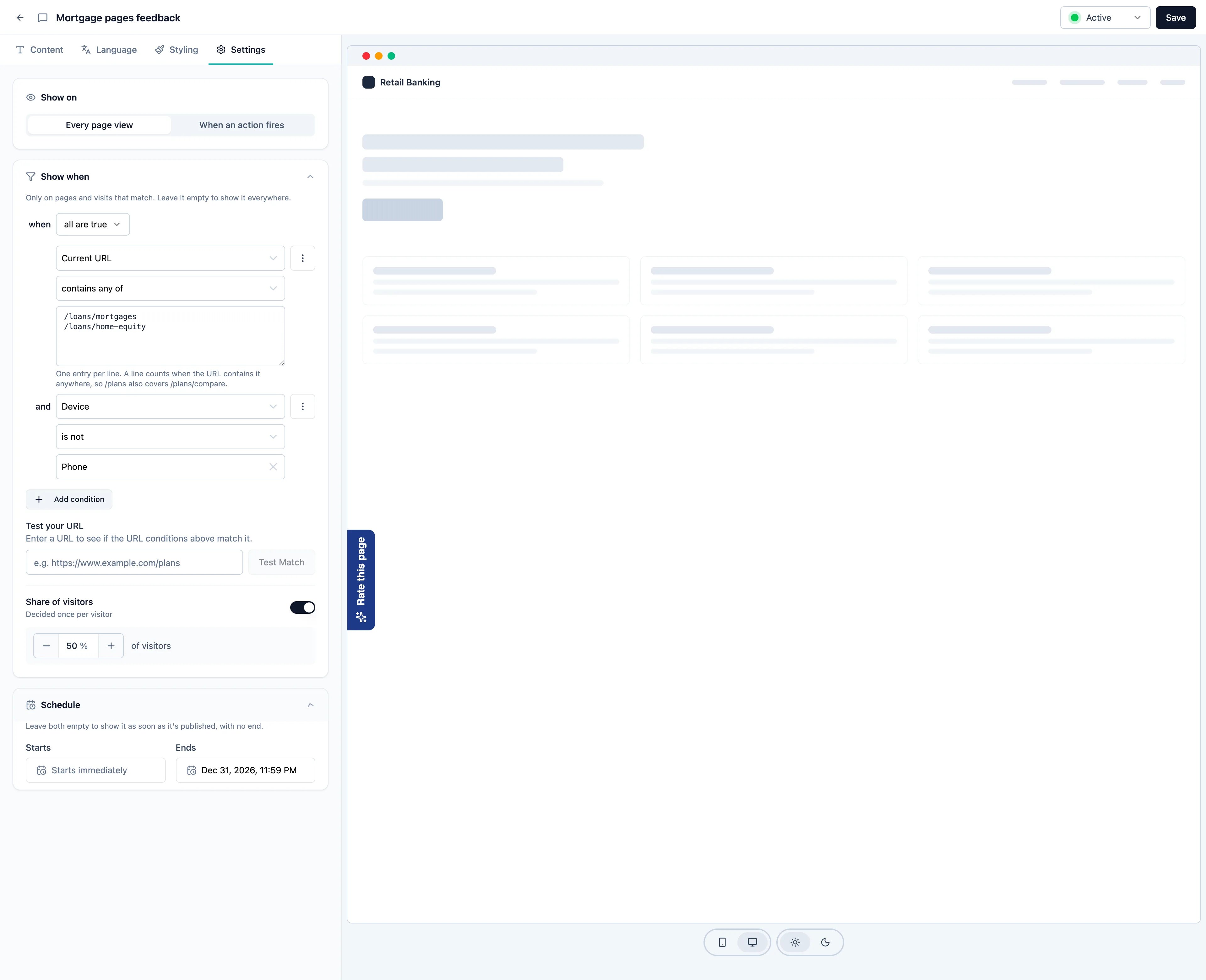
Example: show a feedback button on the loan pages only, and not on phones:
Share of visitors
Turn on Share of visitors inside Show when to show the creative to only a percentage of the visitors who match, from 1 to 100 % in steps of 5. It starts at 50 %. Off means everyone who matches. Each visitor’s share is decided once per creative and remembered in their browser, so the same visitor keeps seeing the creative on every page, or keeps not seeing it. Raising the percentage later keeps everyone who already saw it; lowering it hides it only from some of them. A browser that blocks storage decides again on each page. This works differently from a survey’s display percentage, which is rolled again on every trigger.Schedule
Set Starts and Ends to show the creative only during a time window, to the minute, for example a maintenance notice from 02:00 to 04:00. Leave both empty to show it as soon as it’s published, with no end. The end has to be after the start. Times are entered in your browser’s time zone, shown next to the fields. The creative switches on and off at the same moment for every visitor, wherever they are. Formbricks corrects for visitors whose device clock is a few minutes off. Until its start, a published creative reads Scheduled. After its end, it reads Closed; to show it again, move its end on the Settings tab and resume it.When changes reach your site
Formbricks sends each visitor’s browser everything it needs to draw your creatives and refreshes it from time to time. So a change you make in Formbricks takes a moment to reach your site:- New visitors get your changes within a few minutes.
- Returning visitors whose browser already has your creatives pick up changes on the next refresh, at most about an hour later. This applies to publishing, editing, pausing and deleting a creative.
- A schedule switches the creative on and off to the minute for visitors whose browser already has it. Publish time-critical banners well ahead of their start.
Several creatives on one page
Every creative that matches a page shows on it. Banners on the same edge stack, the newest closest to the edge, and feedback buttons move aside so Overlay banners don’t cover them. An open survey always sits on top of creatives. To catch overlaps before visitors do, the Creatives list flags active creatives that could collide on the same page, such as two feedback buttons at the same spot. See Manage creatives.Why isn’t my creative showing?
Check, in order:- Status. Hover the status in the Creatives list. Scheduled, Paused and Closed say why, for example “Paused with its survey, which isn’t active”.
- The snippet. The page needs the Formbricks JavaScript SDK for this workspace. Mobile apps don’t show creatives.
- Timing. Returning visitors can take up to an hour to see a new or changed creative. Use
?formbricksDebug=trueto load the latest state. - Show on. If it shows on actions, the action has to fire on the current page.
- Show when and Share of visitors. Check the conditions against the page, and remember that a visitor outside the share keeps not seeing it.
- Language. If it opens a multi-language app survey, visitors whose site language the survey lacks don’t see it. The editor warns about this on the Language tab.
- A closed banner stays closed for the rest of the visit in that tab. Open the page in a new tab.
Still have questions? Join us in GitHub Discussions and we’ll be glad to help.