

Neither is a lesser version of the other. A field only one survey will ever have belongs on that survey; a field several surveys should agree on belongs in the library, so that changing its type or its default once changes it everywhere.
Adding a Field to a Survey
In the survey editor, on the Questions tab, scroll to the Embedded Data card and choose Add field. The dialog has two tabs:1
Select library field
Everything the workspace already defines that this survey does not have yet. Picking one links it — the
survey follows the library definition from then on.A library field is missing from the list when the survey already has it, or when another field on the
survey already answers to that name.
2
Create new field
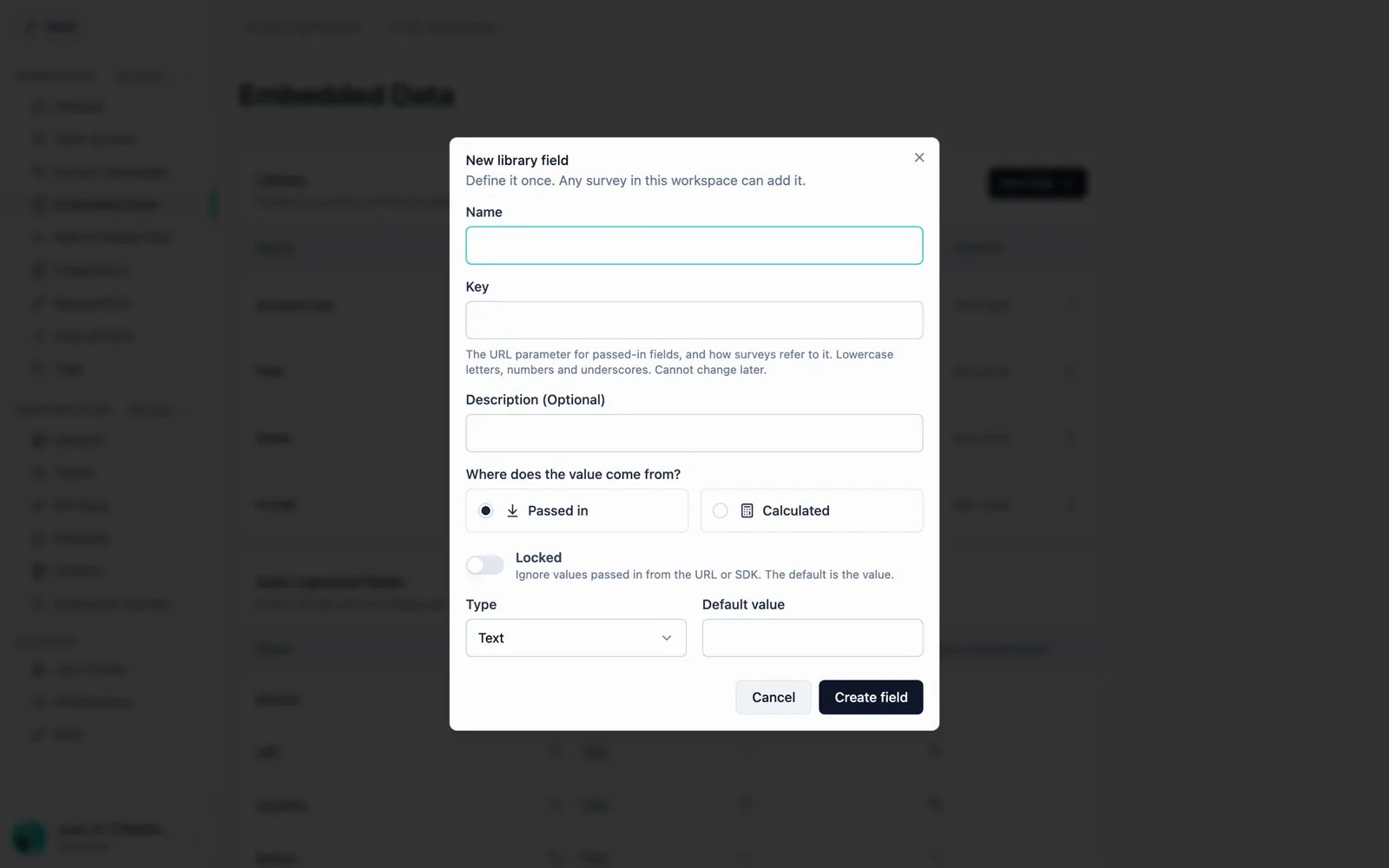
A field only this survey gets. Give it a Name, pick where the value comes from, and set its type and
default — plus the lock, for a passed-in field.
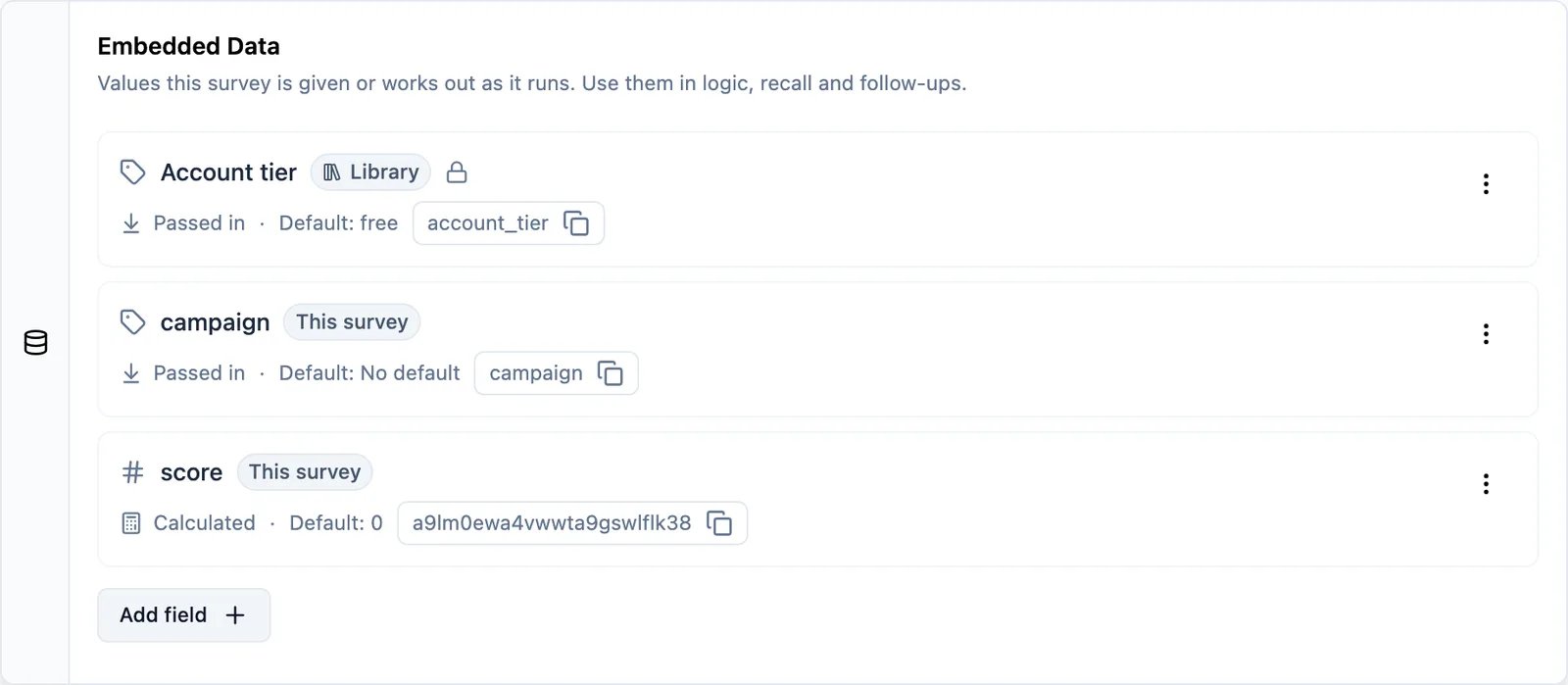
Name and Key
A passed-in field has two things a person types, and they are not the same:- Name is what you and your team call the field. It is what the response table, the summary and your exports show. Rename it any time.
- Key is the address the value lives under: the URL parameter (
?your_key=value), the SDK key, and what recall and logic resolve. It is lowercase letters, numbers and underscores, and it cannot be changed once the field exists — responses already collected are stored under it.
A calculated survey field has one control, and its name still has to read like a key — lowercase
letters, numbers and underscores. That name is both what the survey refers to it by and what the response
table shows. Its storage address is generated for you and never typed.A calculated library field asks for both, like a passed-in one: the Name is what the response table
shows, and the Key is how surveys refer to it in recall and logic. Its storage address is still generated.
The Library Page
Settings → Workspace → Embedded Data is where the library lives. The Library card lists every shared field with its key, source, type, default and how many surveys use it; the Used in cell names them.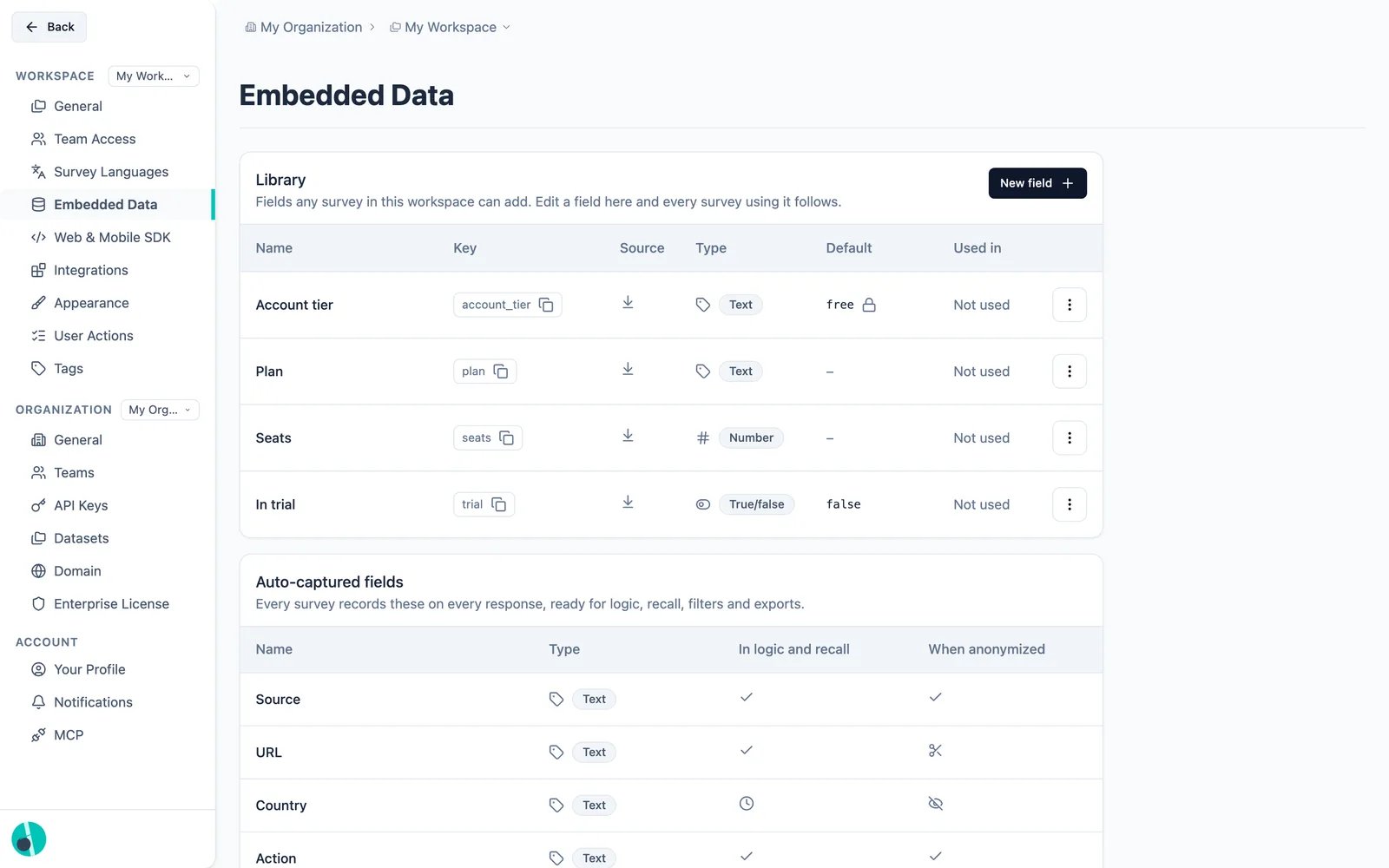
- Editing a field applies to every survey using it. The dialog says so before you save.
- Deleting is blocked while a field is in use. Formbricks names the surveys still holding it and asks you to remove it from those first.
-
Changing a field’s type is asked about, not applied silently, once responses exist. No stored value is rewritten — but reading one goes through the field’s current type, so responses you already collected can come back differently:
- A value that fits the new type is read as it:
"42"under a field retyped to number comes back as42. - A value that does not fit falls back to the field’s default, or reads as unset when it has none.
"gold"under a field retyped to number is still stored, and still exported, but no longer resolves.
- A value that fits the new type is read as it:
Moving a Field Between the Two
Both directions exist, and neither loses data.1
Edit a copy — from library field to survey field
On a linked library field’s row in the survey editor, Edit a copy stops this survey following the
library and gives it a copy only it can change. The library field is untouched and every other survey
keeps it. Undo it by removing the copy and adding the library field back.
2
Add to library — from survey field to library field
On a survey field’s row, Add to library gives it a library key, after which any survey in the
workspace can add the same field.
Removing a Field From a Survey
What “remove” means depends on which kind it is, and the dialog says which one you are about to do:- A library field is unlinked. It stays in the workspace library, other surveys keep it, and you can add it back at any time. This survey stops collecting it.
- A survey field is deleted. This survey stops collecting it, and values already recorded on responses are kept — removing a field never touches data you have already collected.
Locked Fields
A locked passed-in field ignores whatever a URL parameter or the SDK sends and uses its default instead. That is how you fix a value nobody outside the survey can write — useful when a field must mean the same thing on every response regardless of how the link was built. Locking applies to passed-in fields only. A calculated field is written by the survey’s own logic, so there is nothing outside to lock out.What the Warnings on a Row Mean
A survey carried over from before Embedded Data can hold a field that today’s rules would not allow. Those fields keep working — nothing is renamed or dropped — but the card marks them, because the reason each is unusual is worth knowing:
None of these blocks a save. They are there because the addresses values are already stored under cannot change, so the fix is never a rename.
What the API Sees
Nothing about the library changes the shape of the survey resource.hiddenFields and variables keep the same keys (only hiddenFields.enabled is derived), whether a field was declared on the survey or linked from the library, so integrations built against the management API keep working untouched.
The library itself is not exposed on the public API in this release, and neither GET /api/v3/surveys/{id} nor the MCP get_survey tool returns the field definitions behind those two keys.