
Typeform vs Tally (vs Formbricks): Which Form Builder Should You Actually Choose in 2026?

Johannes
Co-Founder @ Formbricks
14 Minutes
August 16th, 2026
If you're comparing Typeform vs Tally, you're weighing polish against price. Typeform built its brand on conversational, one-question-at-a-time forms with heavy design customization. Tally built its brand on giving away nearly everything Typeform charges for, for free, in a Notion-style editor.
I believe Typeform is the right call if:
- Visual design and respondent engagement drive your form's purpose, especially for lead-gen or marketing-facing forms
- You need advanced conditional logic, answer piping, or question-by-question drop-off analytics
- You want a large native integration library (120+) without leaning on Zapier for common connections
- Budget is flexible enough that a $39/month entry tier capped at 100 responses doesn't concern you
I believe Tally is the right call if:
- You want unlimited forms and unlimited submissions on a genuinely free plan, not a limited trial
- Conditional logic, file uploads, and payment collection mattering more to you than visual polish
- Your team already lives in Notion, Airtable, or Google Sheets and wants a native, no-extra-cost connection
- You don't need HIPAA-level compliance or a large built-in integration catalog
Both platforms are cloud-only form builders. Neither is built around an ongoing feedback program: aggregate dashboards, response segmentation, or automated post-response workflows the way a dedicated experience management platform is. If that's closer to what you actually need, there's a third option worth knowing before you pick between these two.
👉 Formbricks is an open feedback and experience management suite built around three things: feedback management (website, in-app, link, and email surveys, unified), feedback analytics (aggregate and per-response views, segmentation, drop-off tracking), and workflows and integrations (post-response automation plus native connections to Salesforce, HubSpot, Slack, Google Sheets, and Notion). Both self-serve plans, Free and Pro, publish a real price and ship a full API. A free, self-hosted Community Edition exists for teams that need data to never leave their own infrastructure, something neither Typeform nor Tally offers at any price.
Table of contents:
- Typeform vs Tally vs Formbricks at a glance
- What buyers actually mean by "Typeform vs Tally"
- Typeform: conversational design, at a design-forward price
- Tally: a genuinely free, document-style form builder
- Formbricks: an open feedback and experience management suite
- Side-by-side pricing
- Feature value breakdown
- EU hosting is not the same as self-hosting
- What reviewers say
- Who should choose which platform
- Typeform vs Tally FAQ
- Final verdict
Typeform vs Tally vs Formbricks at a Glance
| Typeform | Tally | Formbricks | |
|---|---|---|---|
| Core strength | Conversational, one-question-at-a-time design | Genuinely free, unlimited-submission form builder | Unified feedback management, analytics, workflows |
| Free plan | Limited monthly responses (10/mo per Tally's and third-party comparisons) | Unlimited forms and submissions, fair-use policy | 100 responses/month, unlimited seats, full API incl. MCP |
| Cheapest published paid tier | Basic: $39/month (100 responses/month) | Pro: $24/month per tally.so/pricing (see pricing discrepancy below) | Pro: $79/month (or $708/year billed yearly) |
| Conditional logic | Yes, paid plans only | Yes, included free | Yes, plus attribute-based segmentation |
| Built-in integrations | 120+ | 6 native (per Typeform's own comparison) to 30+ (per independent testing) | Native integrations plus free API/webhooks on every tier |
| Compliance certifications | PCI, HIPAA, GDPR, WCAG 2.1 (paid plans) | GDPR only, no HIPAA | Self-hosted deployments give you full control over your own compliance posture |
| Data residency / self-hosting | Not offered | EU-hosted (Belgium), but not self-hosted | Free, self-hosted Community Edition |
| Best for | Design-led lead-gen and marketing forms | Budget-conscious teams, simple intake and feedback forms | Ongoing feedback programs, developers, regulated industries |
What Buyers Actually Mean by "Typeform vs Tally"
Most of what ranks for this exact search is either Typeform's own comparison page or Tally's own comparison page, each naturally framing itself as the winner, plus a smaller set of independent form-builder and research-tooling blogs.
Typeform's own comparison page (last published May 2025) frames the decision around design depth, compliance, and analytics: it lists 120+ built-in integrations against Tally's 6, PCI/HIPAA/GDPR/WCAG 2.1 compliance that Tally doesn't match, and question-by-question drop-off analysis that Tally lacks natively. Tally's own comparison page takes the opposite framing, leading with "the only form builder offering unlimited forms and unlimited submissions completely free" and pointing out that Typeform's free plan caps at 10 responses/month while Tally's Pro plan at less than the price of Typeform's Basic plan removes the badge, adds custom domains, and unlocks file uploads and payments that Typeform gates behind its own upgrades.
Independent third-party testing lands in the middle. CleverX's 2026 comparison concludes Typeform's conversational format and richer logic (branching, skip logic, answer piping) suit longer, brand-sensitive surveys, while Tally's Notion-style block editor and free conditional logic suit lightweight internal research, quick polls, and embedded feedback widgets where budget is a real constraint.
Source: Typeform's own Tally comparison, Tally's own comparison page, and CleverX's independent Typeform vs Tally comparison, all captured August 15-16, 2026.
The honest read: this is a "design polish vs. free depth" question, not a "which is better" question. Typeform wins on visual customization, advanced logic, and analytics depth. Tally wins on what you get without paying anything. Neither is built for a recurring feedback program with segmentation or automated follow-up.
Typeform: Conversational Design, at a Design-Forward Price

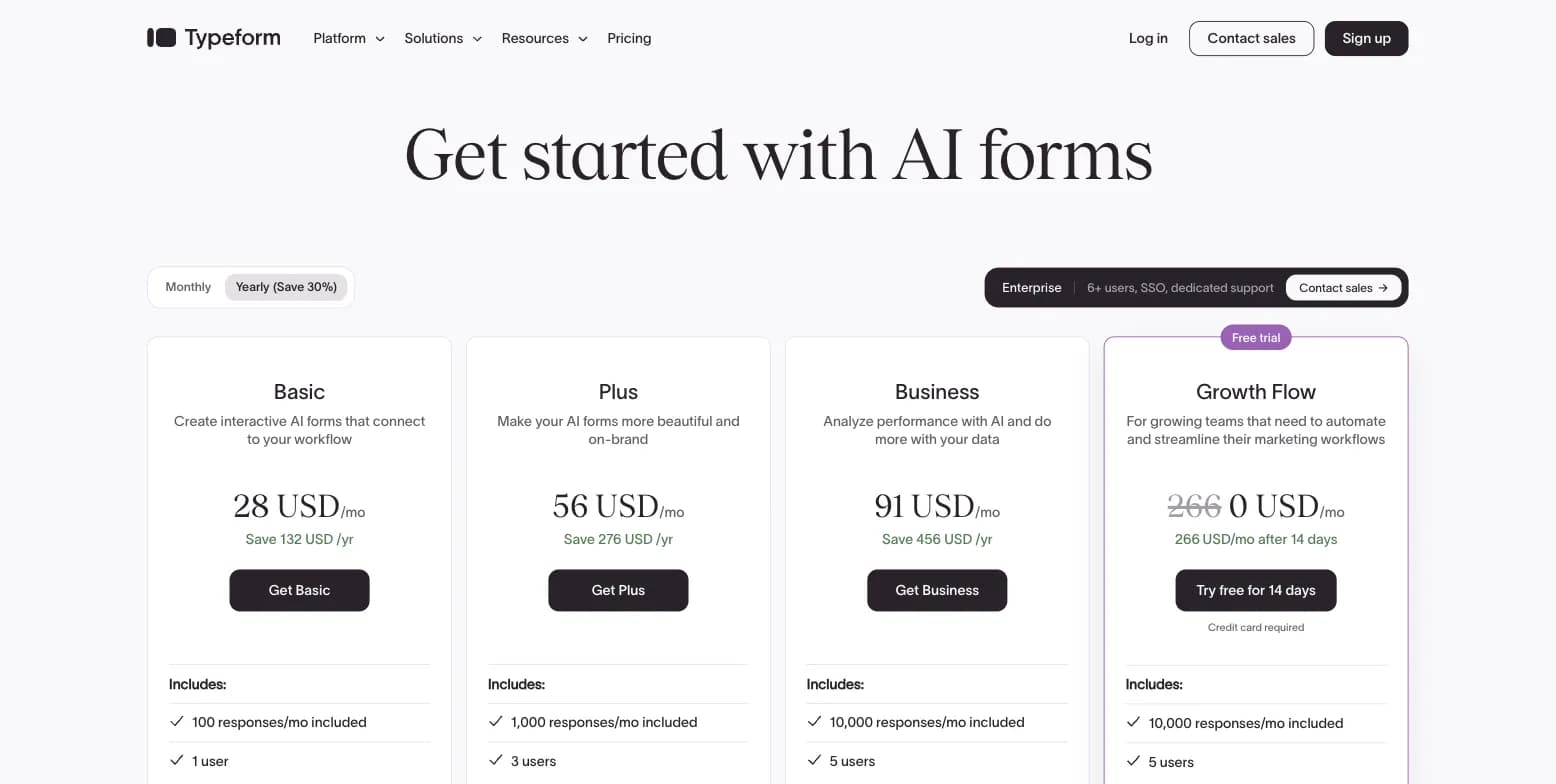
Captured August 15, 2026 from typeform.com.
Co-founders David Okuniev and Robert Muñoz ran separate design agencies in Barcelona before a lead-generation form project for a toilet company (Roca) became the prototype for Typeform in 2012. The company now positions itself around "AI forms and automated workflows," claiming 150,000+ businesses use it and over 250 employees, remote-first since founding.
Conversational, One-Question-at-a-Time Format
Typeform's core differentiator is presenting one question at a time in a chat-like flow rather than a dense grid. Typeform's own data claims 87% of polled users say the format helps them derive deeper insights, and independent reviewers consistently credit the one-question format with higher completion rates for shorter, marketing-facing forms. Typeform AI can build a full form from a prompt, and the platform layers Growth Flow (automated lead enrichment and follow-up) and Research Flow (AI-moderated research interviews) on top of the base form builder.
Pricing
| Plan | Price (billed annually) | Response Limit | Key Features |
|---|---|---|---|
| Free | $0 | Limited monthly responses (10/mo per third-party comparisons) | Unlimited typeforms, 3,000+ templates |
| Basic | $39/month ($468/year) | 100 responses/month | Unlimited typeforms, AI form creation, conditional logic, webhooks |
| Plus | $79/month ($948/year) | 1,000 responses/month | Everything in Basic, remove branding, custom subdomain |
| Business | $129/month ($1,548/year) | 10,000 responses/month | Drop-off rate analytics, conversion tracking, priority support |
| Enterprise | Custom | Custom | VIP account management, enterprise-grade security |
Typeform's own pricing page doesn't display the exact free-tier response cap. Tally's comparison page and CleverX's independent testing both put it at 10 responses/month across all forms, which is the figure used above since it's corroborated by two independent sources rather than Typeform's own marketing.
Where Typeform Falls Short
- Not well suited to long or complex surveys, per third-party review aggregation
- Higher price per response than form-builder competitors at the entry tier, $39/month for just 100 responses on Basic
- Response-based pricing escalates quickly once you're running any meaningful survey volume
- Not an XM/experience-management platform, it's optimized for lead-gen and conversational data capture, not structured, recurring CX program management
Tally: A Genuinely Free, Document-Style Form Builder
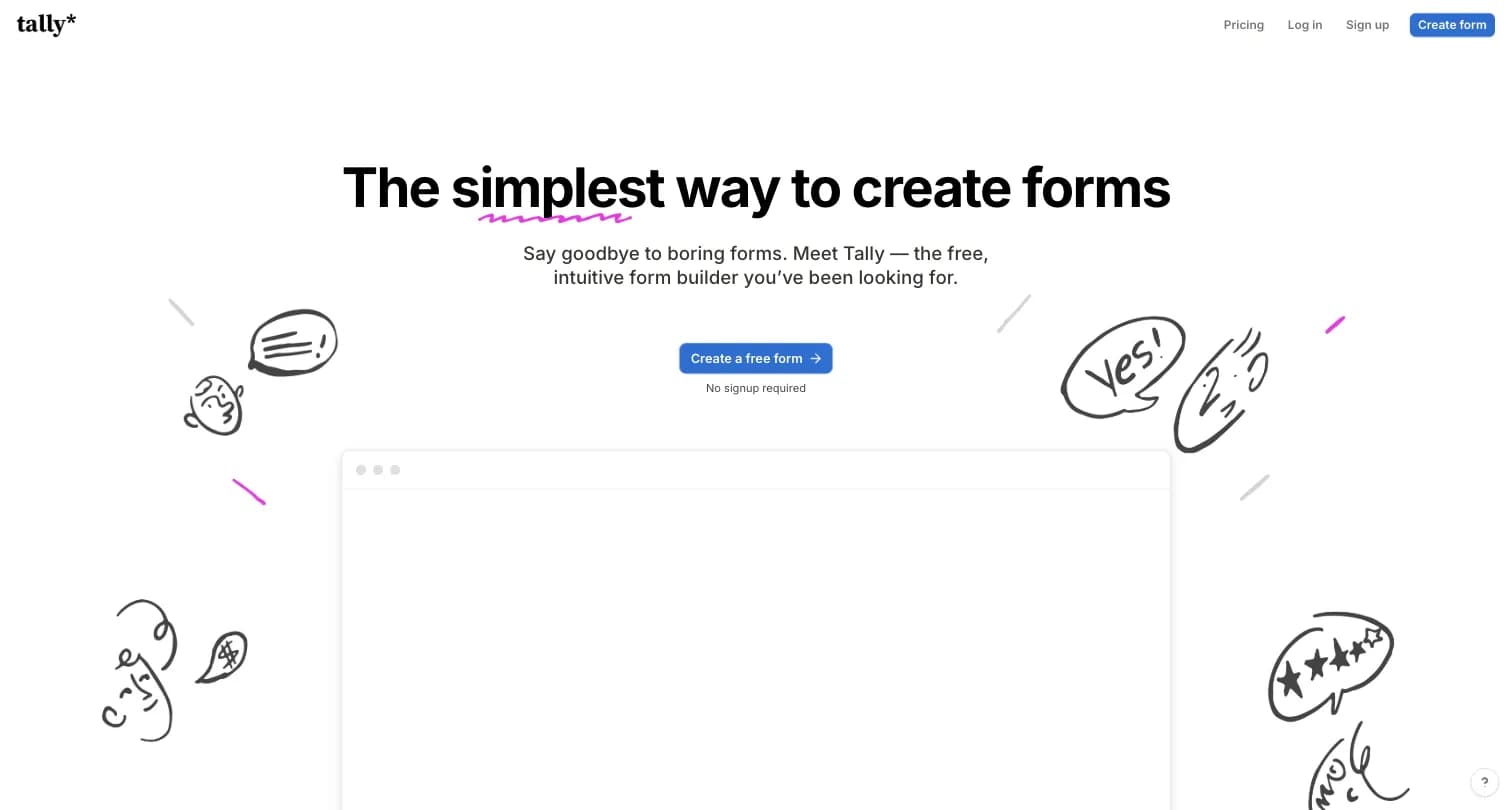
Captured August 15, 2026 from tally.so.
Marie Martens and Filip Minev, based in Ghent, Belgium, had quit their jobs to build a travel-influencer platform when COVID-19 lockdowns hit during a layover in Bangkok in 2020. After six months without revenue, they pivoted to a form builder born from their own frustration with expensive, bloated tools like Typeform. Inspired by Notion's inline-editing UX, they started building Tally in September 2020. The company remains fully bootstrapped with no outside investors, reached $5M in annual revenue by its fifth year, and runs with a 10-person team, powering 500,000+ teams according to its own site.
A Document-Style Editor, Not a Drag-and-Drop Builder
Tally's core differentiator is its Notion-like inline editor: you type questions directly onto a page and insert input blocks with shortcuts, rather than dragging elements onto a canvas. This makes it fast to learn and quick to build with, though independent testing (CleverX) notes it lacks the animated transitions and visual polish of Typeform's conversational format. Tally supports conditional logic, hidden fields, answer piping, and a formula/calculator engine, all on the free plan.
Pricing
| Plan | Price | Response Limit | Key Features |
|---|---|---|---|
| Free | $0 | Unlimited forms and submissions, within Tally's fair-use policy | Conditional logic, file uploads, payments, calculations, no feature paywall |
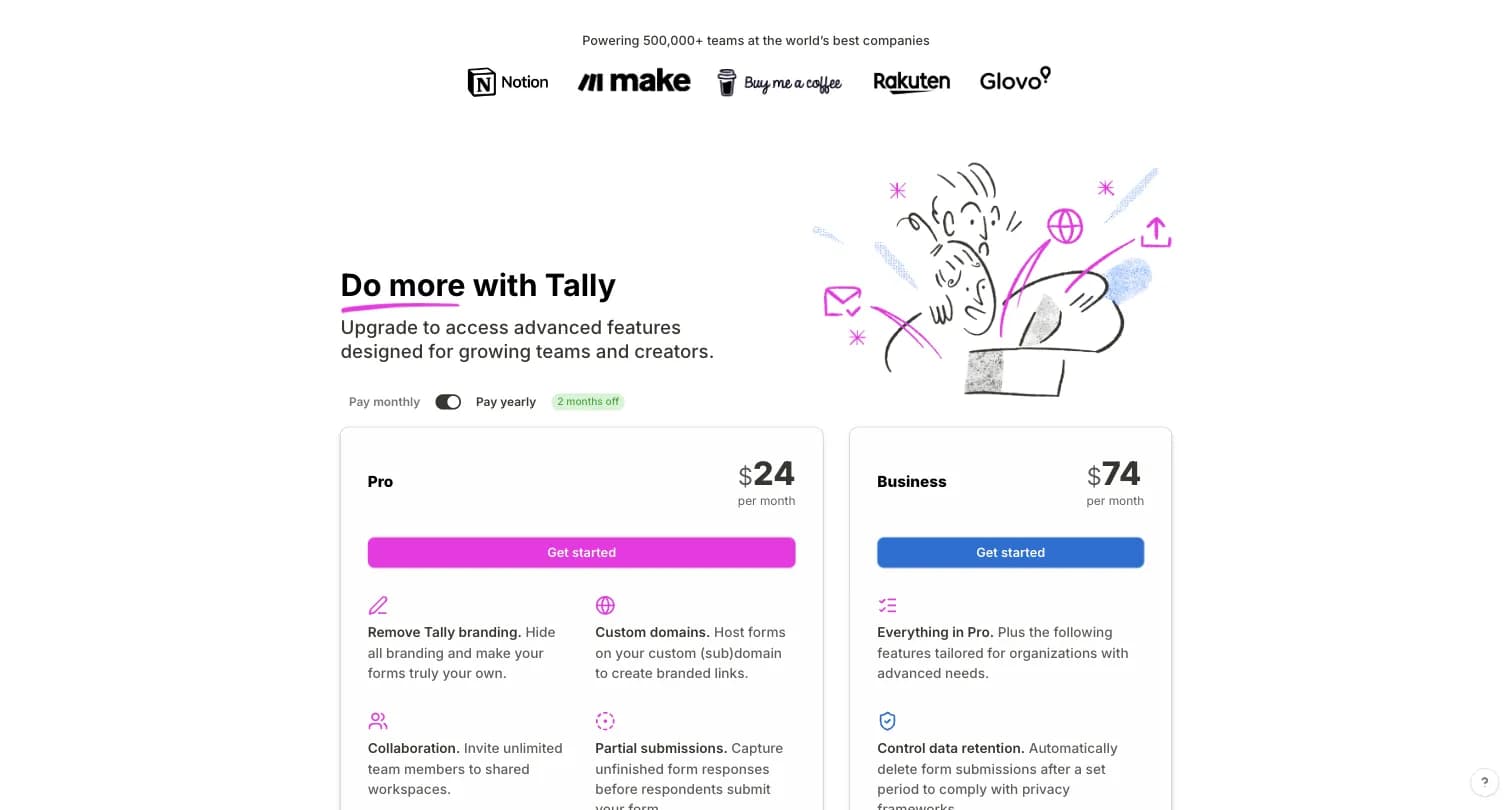
| Pro | $24/month per tally.so/pricing (billed monthly) | Unlimited | Remove Tally branding, custom domains, unlimited team members, partial submissions, custom CSS, drop-off analytics |
| Business | $74/month per tally.so/pricing (billed monthly) | Unlimited | Everything in Pro, control data retention, verify respondent emails, 90-day version history |
A pricing discrepancy worth flagging: Tally's own pricing page (tally.so/pricing) shows Pro at $24/month, but Tally's own comparison page (tally.so/help/compare), captured the same day, lists Tally Pro at $29/month, matching the figure G2's vendor-submitted pricing widget and CleverX's independent comparison both cite. This is a same-day, same-company discrepancy across Tally's own pages, not a stale third-party estimate. Confirm the current number directly on tally.so/pricing before quoting it.
Where Tally Falls Short
- Design customization is limited, forms are largely stuck in a Notion-style layout, per G2 reviews
- Analytics are fairly basic, some users export data elsewhere for deeper analysis
- Only 6 native integrations by Typeform's own count (independent testing puts it closer to 30+ once Zapier and Make are included), versus Typeform's 120+
- No HIPAA compliance and no dedicated XM/CX program features, it's a lightweight form and survey builder, not a purpose-built NPS/CSAT platform
Formbricks: An Open Feedback and Experience Management Suite
Formbricks isn't a third form builder competing on price or design polish. It's an open source feedback and experience management suite built around three things: feedback management, feedback analytics, and workflows and integrations, published transparently and included on every tier rather than upsold as add-ons.
Feedback Management. Formbricks unifies collection channels that neither Typeform nor Tally combine on one platform: website surveys that target specific visitors, in-app surveys that reach any user cohort inside your product, link surveys for broad distribution, and branded surveys embedded directly in email.
Feedback Analytics. Response data flows into one place regardless of channel. You can follow individual feedback trails or zoom out for the aggregate picture, track partial and dropped-off responses, and segment by custom attributes, going further than Typeform's Business-tier drop-off analytics or Tally's basic per-form reporting.
Workflows and Integrations. Formbricks Workflows automate what happens after a response comes in, routing and acting on feedback without manual handling. On the integration side, Formbricks connects to Salesforce, HubSpot, Slack, Google Sheets, and Notion through webhooks and its open API, free on every tier, including the self-hosted Community Edition.
Formbricks Pricing
| Plan | Monthly Billing | Annual Billing | Responses/Month | Workspaces |
|---|---|---|---|---|
| Free | Free | Free | 100 | 1 |
| Pro | $79/month | $708/year (displayed as $59/mo) | 1,000 | 1 |
Both plans include unlimited seats. Pro comes with a 7-day free trial, and you can add workspaces for $49/month each and responses for $49 per 1,000 as you grow.
At $708/year for 1,000 responses/month (12,000/year), Formbricks Pro works out to roughly $0.06 per response, well below Typeform Basic's $468/year for just 100 responses/month (1,200/year), or roughly $0.39 per response. Tally's unlimited free responses beat both on raw response volume per dollar, but Formbricks Free still includes full API access, including MCP, and unlimited seats, branding removal is bundled into Pro rather than a separate paywall, and conditional logic ships from the free tier.
Formbricks Self-Hosting: Community Edition
The free, self-hosted Community Edition, licensed under AGPLv3, is where Formbricks diverges most sharply from both Typeform and Tally. Data never leaves your own infrastructure, there's no response cap, and even if you stop paying for Enterprise features, the Community Edition and your data remain accessible. Neither Typeform nor Tally offers an equivalent self-hosting path at any price, Tally's EU hosting is a privacy posture, not a data-ownership guarantee.
Side-by-Side Pricing
| Typeform | Tally | Formbricks | |
|---|---|---|---|
| Free tier | Limited monthly responses (10/mo) | Unlimited forms and submissions, fair-use | 100 responses/month, unlimited seats, full API incl. MCP |
| Cheapest paid tier | Basic: $39/month, 100 responses/month | Pro: $24-29/month depending on source, unlimited | Pro: $79/mo (or $708/yr billed yearly) |
| Mid tier | Plus: $79/month, 1,000 responses/month | Business: $74/month, unlimited | Pro plus add-ons: $49/mo per extra workspace, $49 per 1,000 extra responses |
| Upper tier | Business: $129/month, 10,000 responses/month | Not offered (2-tier ladder above free) | Experience Suite: custom pricing, published contact path |
| Enterprise | Custom, VIP account management | Not offered | Experience Suite: human support and custom terms |
| Self-hosting | Not offered | Not offered | Free Community Edition, self-hosted |
| Feedback channels | Conversational forms | Document-style forms | Website, in-app, link, and email, unified |
Feature Value Breakdown
Design and Respondent Experience
Typeform's Approach: One-question-at-a-time conversational flow with rich media (images, video, GIFs) on every question, brand kits, custom fonts, and 3,000+ templates. Widely credited with higher completion rates for shorter, marketing-facing forms.
Tally's Approach: A fast, functional Notion-style block editor with a standard multi-question layout by default. Customizable fonts, images, and backgrounds exist, but independent testing (CleverX) notes it lacks Typeform's animated transitions and visual polish.
Formbricks' Approach: A no-code builder for standard survey layouts, with in-app and website survey targeting that neither competitor offers as a native channel.
Value Verdict: Typeform wins clearly on visual design and engagement for marketing-facing forms. This is Typeform's real differentiator, not a marginal one.
Pricing Transparency and Value
Typeform's Approach: All four core tiers (Free, Basic, Plus, Business) publish a real price, though the pricing page also mixes in separate "Talent" and "Growth Flow" products layered onto the same page.
Tally's Approach: Every core tier publishes a real price too, but Tally's own pricing page and its own comparison page disagree on the Pro tier's exact number ($24 vs $29/month), a discrepancy worth confirming directly before quoting.
Formbricks' Approach: Both self-serve plans, Free and Pro, are priced and published on the site, with both monthly and annual billing shown up front, and no internal discrepancy across pages.
Value Verdict: All three publish real prices, a rarity worth noting given how many competitors in this category gate pricing behind sales calls. Tally wins on raw value per dollar for high-volume, low-complexity use, thanks to its unlimited free tier.
Logic, Branching, and Analytics Depth
Typeform's Approach: Advanced conditional logic, skip logic, answer piping, and hidden fields for tracking parameters, available from the Plus plan upward. Question-by-question drop-off analysis and Smart Insights AI for open-ended responses are available on paid tiers.
Tally's Approach: Conditional logic, hidden fields, and a formula/calculator engine ship free, a real advantage over Typeform's paid-tier gating. Analytics are comparatively basic, some users export data elsewhere for deeper analysis, and answer piping requires Pro.
Formbricks' Approach: Attribute-based segmentation with conditional logic for targeting who sees a survey, plus feedback analytics (drop-off tracking, per-response views) built for an ongoing program rather than a one-off form report.
Value Verdict: Typeform wins on logic and analytics sophistication for complex, branching forms. Tally wins on getting basic logic for free. Formbricks wins if the goal is tracking feedback trends and segments over time rather than a single form.
Integrations and Data Routing
Typeform's Approach: 120+ built-in integrations, including HubSpot, Salesforce, Slack, Mailchimp, Dropbox, and monday.com, per its own comparison page.
Tally's Approach: Typeform's own comparison page counts just 6 native Tally integrations; independent testing (CleverX) counts closer to 30+ once Notion, Airtable, Google Sheets, Slack, basic HubSpot, Zapier, and Make are included. Either way, Tally's library is smaller, with Zapier or Make closing most remaining gaps.
Formbricks' Approach: Native integrations to Salesforce, HubSpot, Slack, Google Sheets, and Notion, plus a free API and webhooks on every tier, including the self-hosted Community Edition.
Value Verdict: Typeform wins clearly on integration breadth. If your workflow runs through Salesforce or a less common CRM, check each tool's library directly before committing.
Customer Support
Typeform's Approach: A wide-ranging Help Center, tutorial videos, a community forum, and 24/7 live support on paid plans, per Typeform's own comparison page.
Tally's Approach: A smaller Help Center with how-to guides and a support ticket form. G2 reviewers specifically call out fast, helpful responses from Tally's team despite the smaller support surface.
Formbricks' Approach: Community support through GitHub and Discord on Free, Pro, and the self-hosted Community Edition, with human support included in the Experience Suite.
Value Verdict: Typeform wins on the breadth of support channels and paid-tier live support. Tally's smaller team still earns real credit from reviewers for responsiveness, even without 24/7 coverage.
Data Residency and Self-Hosting
Typeform's Approach: Cloud-only, no regional data residency or self-hosting choice mentioned anywhere in its pricing or product documentation.
Tally's Approach: Hosted in the EU (Belgium), GDPR-compliant, no cookie tracking, but still a single-vendor cloud service. No self-hosting option at any tier.
Formbricks' Approach: A free, self-hosted Community Edition under AGPLv3 keeps data on your own infrastructure entirely, on every plan.
Value Verdict: Formbricks wins clearly for any buyer where self-hosting or true data ownership is a hard requirement, not just a hosting-location preference.
EU Hosting Is Not the Same as Self-Hosting
Tally leans hard on its privacy framing: "Made and hosted in the EU," no cookie tracking, GDPR-compliant by default. It's a genuinely stronger privacy posture than Typeform's, which doesn't advertise a specific hosting region in its own comparison content. But EU hosting describes where Tally's servers sit, not who controls the data on them.
With both Typeform and Tally, your form responses live on infrastructure you don't own or operate, governed by a vendor's terms of service, uptime, and continued existence as a company. If a compliance requirement, an internal security review, or a customer contract specifically demands that response data never leave infrastructure you control, EU hosting doesn't satisfy that requirement, self-hosting does.
Formbricks' Community Edition is the option in this specific comparison that actually offers that: a free, self-hosted deployment where the data never touches Formbricks' servers at all, not just a server located in a favorable jurisdiction. For most Typeform and Tally buyers, this distinction won't matter, simple forms and lead-gen capture rarely trigger a hard data-residency requirement. But if you're the buyer for whom it does matter, it's worth knowing the difference exists before you assume "EU-hosted" already covers you.
What Reviewers Say
Typeform holds a 4.5 rating across 1,017 reviews on G2 and 4.7 across 973 reviews on Capterra. Tally holds a 4.9 rating across 141 reviews on G2, across the Survey, Online Form Builder, and Event Registration & Ticketing categories.
| Typeform | Tally | |
|---|---|---|
| What reviewers like | Design quality and user experience, frequently cited as the reason to choose Typeform over competitors | Ease of use and an intuitive, document-like interface with a short learning curve; insanely feature-packed for a free tool, with strong conditional logic and responsive support |
| What reviewers dislike | Not well suited to long or complex surveys; higher price per response than form-builder competitors at the entry tier | Design customization is limited, forms are largely stuck in a Notion-style layout; analytics are fairly basic; advanced scoring or tie-breaker logic requires manual workarounds |
Tally's smaller review count (141 vs Typeform's combined 1,990 across G2 and Capterra) reflects its younger age (founded 2020 vs Typeform's 2012) and smaller scale, not necessarily lower satisfaction, its G2 score is in fact higher.
Who Should Choose Which Platform
Choose Typeform if:
- Visual design and respondent engagement drive your form's purpose, especially for lead-gen or marketing-facing forms
- You need advanced conditional logic, answer piping, or a large built-in integration library
- Question-by-question drop-off analytics and Smart Insights AI matter for optimizing your forms
- You're comfortable with response-capped pricing that escalates as your volume grows
Choose Tally if:
- Unlimited free forms and submissions matter more than visual polish
- You want conditional logic, file uploads, and payment collection without paying anything
- Your team already works in Notion, Airtable, or Google Sheets and wants a native, no-extra-cost connection
- You're comfortable confirming the exact Pro-tier price directly on tally.so before committing, given the discrepancy noted above
Choose Formbricks if:
- You want one platform for website, in-app, link, and email feedback instead of forms alone
- You need feedback analytics (segmentation, drop-off tracking) and Workflows built in, not sold separately or gated to a paid tier
- Self-hosting or true data ownership is a real requirement, not just a preference for EU-based servers
- Your engineering team wants full API access, including MCP, free on every tier
Typeform vs Tally FAQ
Is Tally better than Typeform?
How much does Typeform cost?
How much does Tally cost?
Does Tally really have unlimited free responses?
What are the disadvantages of Typeform?
What are the disadvantages of Tally?
Which has more integrations, Typeform or Tally?
Does Typeform or Tally offer self-hosting?
Is Typeform HIPAA compliant? Is Tally?
Which is easier to use, Typeform or Tally?
Does Typeform have better analytics than Tally?
Is Formbricks a good alternative to Typeform and Tally?
Can I switch from Typeform or Tally without losing my data?
Final Verdict
👍 Typeform is the right call if visual design and respondent engagement are the priority, especially for lead-gen or marketing-facing forms where a conversational flow measurably improves completion. Its logic depth, analytics, and 120+ integrations are real advantages once you're past the free tier's response cap.
👍 Tally is the right call if your budget is the deciding factor and you want conditional logic, file uploads, and payments without paying anything. Just confirm the exact Pro-tier price directly on tally.so given the discrepancy between Tally's own pages, and know that design customization and analytics depth are real trade-offs for that price.
👉 Formbricks is the better fit if you want one platform for website, in-app, link, and email feedback instead of choosing between a design tool and a free tool, and you want feedback analytics and integrations built in from a published, monthly-or-yearly price. The self-hosted Community Edition also gives you an actual data-ownership option neither Typeform's cloud infrastructure nor Tally's EU hosting offers.
The honest read: Typeform and Tally solve different problems (polish vs. price), and picking between them usually comes down to whether your form needs to convert and impress, or just needs to exist and work for free. If neither answers the feedback-analytics or self-hosting question you came here with, see Formbricks' current pricing here.