
Paperform Pricing in 2026: What It Actually Costs Once You Do the Annual-to-Monthly Math

Johannes
Co-Founder @ Formbricks
12 Minutes
August 16th, 2026
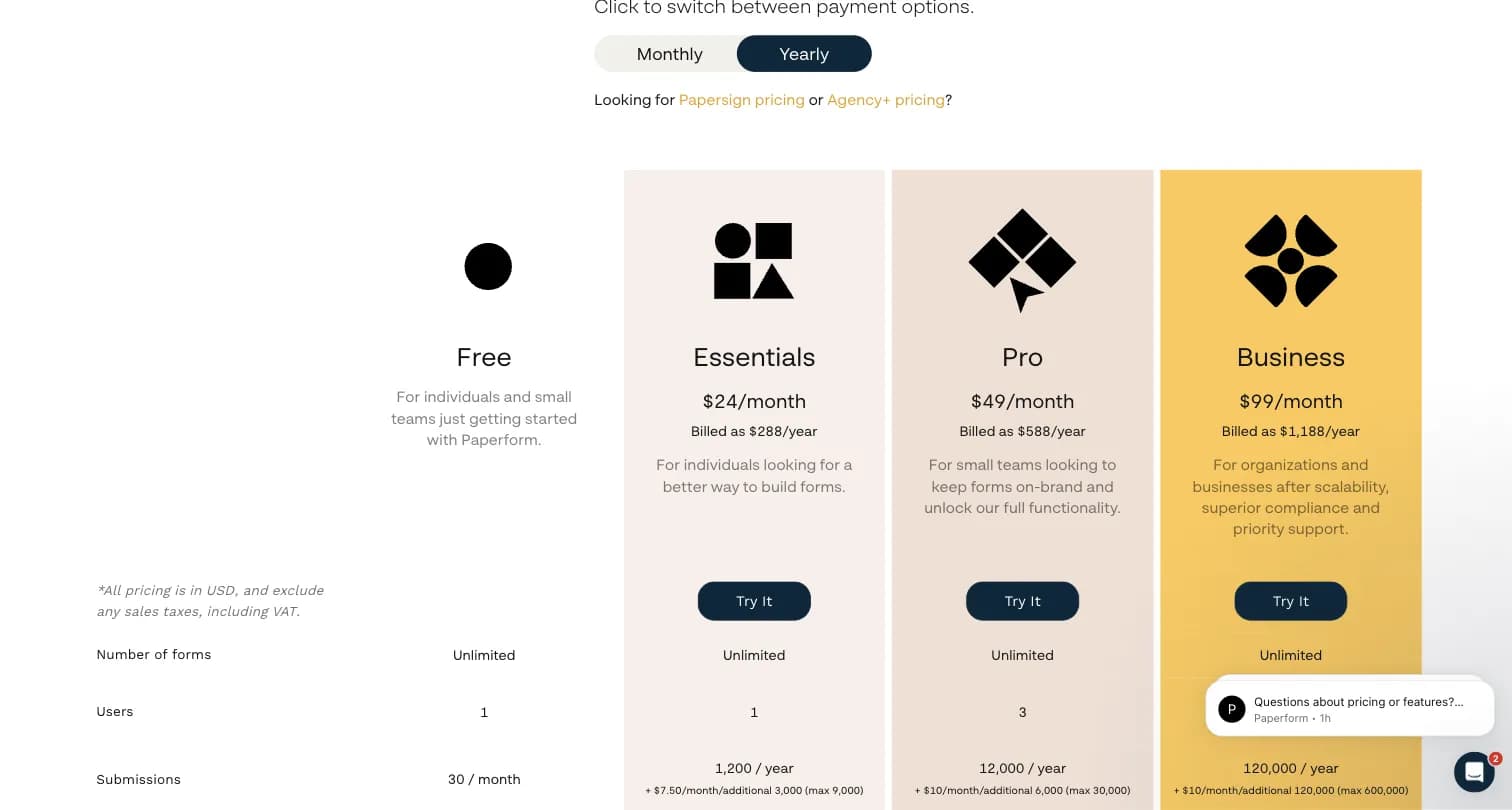
Paperform's pricing page reads simply at first glance: Essentials at $24/month, Pro at $49/month, Business at $99/month. But look closer and each tier's response cap is quoted per year, not per month, the way most competitors quote theirs. That $24/month Essentials plan caps at 1,200 submissions/year, which works out to roughly 100/month, a lower ceiling than it appears next to a headline monthly price.
I pulled Paperform's live pricing page, cross-checked the annual-vs-monthly submission math, and compared it against Formbricks, an open feedback and experience management suite. Here's what Paperform actually costs, where the numbers need translating, and how it compares.
I believe Paperform is the right call if:
- You want a document-style editor that makes forms look and read like landing pages
- Your form needs to handle payments, subscriptions, bookings, or e-signatures natively
- Your submission volume genuinely stays under 100/month, so the annual-cap math doesn't bite
- Design flexibility and customer support quality matter more than the lowest sticker price
It's a weaker fit if:
- You're comparing sticker prices across tools without converting Paperform's annual caps to a monthly rate
- You need custom CSS or font control at the entry tier, both are gated to higher plans
- You want an ongoing feedback program with analytics and segmentation, not a one-off intake form
- You want a free, self-hosted option for full data control
Because of that, I've included a full comparison with Formbricks later in this breakdown.
Table of contents:
- Paperform Pricing at a Glance
- The Annual-to-Monthly Submission Math, Explained
- Free Plan
- Essentials: $24/Month
- Pro: $49/Month
- Business: $99/Month
- Where Paperform Pricing Falls Short
- Formbricks: An Open Feedback and Experience Management Suite
- What Reviewers Say About Paperform
- Feature Value Breakdown
- Side-by-Side Pricing
- Who Should Actually Pay for Paperform
- Paperform Pricing FAQ
- Final Verdict
Paperform Pricing at a Glance
| Plan | Price | Submissions | Notes |
|---|---|---|---|
| Free | $0 | 30/month | Paperform branding, 100 MB storage, limited live support |
| Essentials | $24/month ($288/year if paid annually) | 1,200/year (~100/month) | Standard live support, minimal branding, 1 GB storage |
| Pro | $49/month ($588/year if paid annually) | 12,000/year (~1,000/month) | Priority support, removable branding, 10 GB storage |
| Business | $99/month ($1,188/year if paid annually) | 120,000/year (~10,000/month) | First-priority support, removable branding, 100 GB storage |
Source: paperform.co/pricing, captured August 15, 2026.
Captured August 15, 2026 from paperform.co.
The Annual-to-Monthly Submission Math, Explained
This is the part most "Paperform pricing" searches run into. Every tier above Free quotes its submission limit per year: Essentials at 1,200/year, Pro at 12,000/year, Business at 120,000/year. Divide by 12 and the effective monthly caps are roughly 100, 1,000, and 10,000, respectively.
That's not necessarily a bad deal, it just means a direct sticker-price comparison against a competitor that quotes a monthly cap (like Jotform's Bronze plan at $34/month for 1,000 submissions/month) requires converting Paperform's number first. Additional submission blocks are available beyond each tier's cap: Essentials can add blocks of 3,000/year for $7.50/month (up to 9,000 total), Pro can add blocks of 6,000/year for $10/month (up to 30,000 total), and Business can add blocks of 120,000/year for $10/month (up to 600,000 total).
Sources: paperform.co/pricing and paperform.co/help/collections/plans-and-features, captured August 15, 2026.
Free Plan
| Feature | Details |
|---|---|
| Price | $0 |
| Submissions | 30/month |
| Storage | 100 MB upload storage |
| Support | Limited live support |
| Branding | Paperform branding included |
| Free Plan | |
|---|---|
| Pros | Cons |
| ✅ No credit card required to start | ❌ 30 submissions/month is a low ceiling for real testing |
| ✅ Full document-style editor available | ❌ Paperform branding can't be removed |
| ✅ Good for evaluating the design experience | ❌ Only 100 MB of upload storage |
The Bottom Line: Free is enough to build and test a form, not to run a real intake or feedback program.
Essentials: $24/Month
| Feature | Details |
|---|---|
| Price | $24/month, or $288/year if paid annually |
| Submissions | 1,200/year (roughly 100/month) |
| Storage | 1 GB upload storage |
| Support | Standard live support |
| Branding | Minimal Paperform branding |
| Essentials Plan | |
|---|---|
| Pros | Cons |
| ✅ Cheapest paid tier with live support | ❌ Effective monthly cap is roughly 100 submissions once annualized |
| ✅ Additional submission blocks available ($7.50/month per 3,000/year) | ❌ Custom CSS and font control are not included at this tier |
| ✅ Minimal branding, a step up from Free | ❌ Storage remains capped at 1 GB |
The Bottom Line: Essentials looks cheap at $24/month until you realize the real cap is closer to 100 submissions a month, comparable to several competitors' free plans.
Pro: $49/Month
| Feature | Details |
|---|---|
| Price | $49/month, or $588/year if paid annually |
| Submissions | 12,000/year (roughly 1,000/month) |
| Storage | 10 GB upload storage |
| Support | Priority live support |
| Branding | Removable Paperform branding |
| Pro Plan | |
|---|---|
| Pros | Cons |
| ✅ Removable branding, unlike Essentials | ❌ Still priced and capped annually, not monthly |
| ✅ Roughly 1,000 submissions/month once annualized | ❌ Custom CSS and font control remain higher-tier features per independent testing |
| ✅ Priority support and 10 GB storage | ❌ At $49/month, priced above Jotform's comparable Silver tier ($39/month) |
The Bottom Line: Pro is the most comparable tier to mid-market competitors on submission volume, but it's priced a step above them once you do the monthly math.
Business: $99/Month
| Feature | Details |
|---|---|
| Price | $99/month, or $1,188/year if paid annually |
| Submissions | 120,000/year (roughly 10,000/month) |
| Storage | 100 GB upload storage |
| Support | First-priority live support |
| Branding | Removable Paperform branding |
| Business Plan | |
|---|---|
| Pros | Cons |
| ✅ Highest submission ceiling and storage | ❌ Comparable to Jotform's Gold plan ($99/month) but without native HIPAA-enabled features |
| ✅ First-priority support | ❌ Additional submission blocks still required beyond 120,000/year for high-growth teams |
| ✅ Full branding removal | ❌ No published Enterprise tier; Business is Paperform's top self-serve plan |
The Bottom Line: Business matches Jotform's Gold tier on price, but without the compliance features (HIPAA) Jotform bundles at the same price point.
Where Paperform Pricing Falls Short
Annual Submission Caps Read Better Than They Are
- Every paid tier quotes submissions per year, not per month, which understates the real monthly ceiling next to competitors that quote monthly caps directly
- Essentials' headline $24/month price caps at roughly 100 submissions/month once annualized
Deep Customization Is Gated to Higher Tiers
- Custom CSS and font controls are only available on higher-tier plans, per independent testing (Fillout)
- Teams that chose Paperform specifically for its design flexibility may not get full control until Pro or Business
Workflow Connections Often Need a Third-Party Service
- Connecting Paperform to existing tools and workflows can require webhooks routed through Zapier or Make, adding steps competitors' native integrations skip
No Published Enterprise Tier
- Business, at $99/month, is Paperform's highest self-serve plan; there's no custom-priced Enterprise tier with SSO, dedicated support, or higher submission caps published anywhere on its pricing page
Formbricks: An Open Feedback and Experience Management Suite
Formbricks isn't a document-style form builder pricing submission caps by the year. It's an open source feedback and experience management suite built around three things: feedback management, feedback analytics, and workflows and integrations, published transparently on every tier with monthly caps quoted directly.
Feedback Management. Formbricks unifies website surveys, in-app surveys, link surveys, and branded email surveys on one platform, with full survey logic available from the Free plan.
Feedback Analytics. Every response flows into one dashboard. Teams can follow individual responses, zoom out for the aggregate view, and segment by custom attributes.
Workflows and Integrations. Formbricks Workflows automate what happens after a response comes in. Native integrations connect to Salesforce, HubSpot, Slack, Google Sheets, and Notion through webhooks and a free, unrestricted API available on every tier, including the self-hosted Community Edition.
Captured August 15, 2026 from formbricks.com.
Formbricks Free Plan: Free Forever
| Feature | Details |
|---|---|
| Price | $0 |
| Workspaces | 1 |
| Responses | 100/month (cloud), quoted monthly, not annually |
| Seats | Unlimited |
| API Access | Full, including MCP |
| Hosting | Frankfurt, Germany |
Where Paperform's Free plan caps at 30 submissions/month, Formbricks' Free plan publishes 100 responses/month, a monthly figure quoted directly, with no annual-to-monthly conversion required.
| Free Plan | |
|---|---|
| Pros | Cons |
| ✅ Response cap quoted monthly, not annually | ❌ 100 responses/month cap |
| ✅ Full API access, no restrictions | ❌ 1 workspace only |
| ✅ Hosted in Frankfurt (EU data residency) by default | ❌ Formbricks branding shown |
| ✅ No credit card required | ❌ No native payments or bookings, unlike Paperform |
The Bottom Line: The Free plan's terms are quoted the way most buyers actually think about usage: per month, not per year.
Formbricks Pro Plan: $79/month (or $59/month billed annually)
| Feature | Details |
|---|---|
| Price | $79/month, or $59/month billed annually ($708/year), with a 7-day free trial |
| Workspaces | 1 (+$49/month per extra workspace) |
| Responses | 1,000/month (+$49 per extra 1,000) |
| Added Features | Contacts, segments and respondent identification, remove branding, AI translations, email follow-ups, custom CSS, spam protection |
At $708/year for 1,000 responses/month (12,000/year), Formbricks Pro works out to roughly $0.059 per response. Paperform's Pro plan costs $588/year for the same 12,000 submissions/year, or roughly $0.049 per submission. The volume matches once you do the conversion; Formbricks spends the difference on unlimited seats, contacts and segments for targeted surveys, and AI translations.
| Pro Plan | |
|---|---|
| Pros | Cons |
| ✅ Monthly response cap quoted directly, no annual math required | ❌ Cloud deployment only at this tier |
| ✅ Unlimited team seats included, no per-seat pricing | ❌ 1,000 response cap ($49 per extra 1,000) |
| ✅ Custom CSS included | ❌ No native payments, subscriptions, or bookings |
| ✅ Published monthly and annual pricing | ❌ 1 workspace (+$49/month per extra) |
The Bottom Line: Pro lands on the same volume as Paperform's Pro tier once you convert Paperform's annual figure, with a cap you never have to convert and unlimited seats for the whole team.
Formbricks Self-Hosting: Community and Enterprise Editions
| Feature | Details |
|---|---|
| Community Edition | Open source, free, unlimited surveys and responses |
| Enterprise Edition | Contact us, adds SSO (SAML/OIDC), multi-language surveys, whitelabel, support SLAs |
| License | AGPLv3 |
| Data Control | Data never leaves your own infrastructure |
Paperform has no published Enterprise or self-hosted tier at any price. Formbricks offers a free, self-hosted Community Edition with no response cap at all, plus a custom-priced Enterprise Edition with SSO and SLAs for teams that need those governance features Paperform doesn't publish.
What Reviewers Say About Paperform
Paperform holds a 4.8 rating across 86 reviews on G2 and a 4.8 rating across 106 reviews on Capterra, among the highest satisfaction scores of any form builder covered in our research, though on a smaller review base than mainstream competitors like Jotform or SurveyMonkey.
| Paperform Reviews | |
|---|---|
| Pros | Cons |
| ✅ Ease of use and design flexibility are the most-cited strengths | ❌ Limited customization in some areas, per reviewer feedback |
| ✅ Customer support quality praised consistently | ❌ Missing features some reviewers expected; perceived as expensive relative to submission caps |
Feature Value Breakdown
Pricing Transparency
Paperform's Approach: Prices are published, but submission limits are quoted per year rather than per month, requiring buyers to do the conversion math themselves before comparing to competitors.
Formbricks' Approach: Every tier's price, response cap, and features are published and quoted monthly, with no annual-to-monthly conversion required.
Value Verdict: Formbricks wins on clarity. Paperform's pricing isn't hidden the way SurveyMonkey's Individual tier is, but the annual-cap framing makes an apples-to-apples comparison harder than it needs to be.
Design and Commerce Features
Paperform's Approach: Native payments, subscriptions, bookings, and e-signatures built directly into the document-style editor.
Formbricks' Approach: No native payments or bookings; focused on feedback collection, not commerce.
Value Verdict: Paperform wins clearly here. If your form needs to process a payment or take a booking, that's Paperform's real differentiator, not a marginal one.
Data Residency and Self-Hosting
Paperform's Approach: Cloud-only with no self-hosting or published Enterprise tier at any price.
Formbricks' Approach: Free, self-hosted Community Edition under AGPLv3, plus a custom-priced Enterprise Edition with SSO and SLAs.
Value Verdict: Formbricks wins clearly for any buyer where self-hosting or data residency is a real requirement.
Cost Per Response at Comparable Volume
Paperform's Approach: Pro plan costs $588/year for a 12,000 submissions/year cap (1,000/month), roughly $0.049 per submission.
Formbricks' Approach: Pro plan costs $708/year for 1,000 responses/month (12,000/year), roughly $0.059 per response, with unlimited seats included.
Value Verdict: Paperform wins narrowly on cost per submission at matching volume. Formbricks' answer for high volume is the self-hosted Community Edition, which has no response cap at all.
Side-by-Side Pricing
| Paperform | Formbricks | |
|---|---|---|
| Free tier | 30 submissions/month | 100 responses/month, published monthly |
| Cheapest paid tier | Essentials: $24/month (~100 submissions/month annualized) | Pro: $79/mo (or $708/yr annual), 1,000 responses/month |
| Mid tier | Pro: $49/month (~1,000 submissions/month annualized) | Pro plus add-ons: $49 per extra 1,000 responses/month |
| Top self-serve tier | Business: $99/month (~10,000 submissions/month annualized) | Experience Suite, quoted after a call |
| Self-hosting | Not offered | Free Community Edition, self-hosted |
| Native payments/bookings | Yes, built in | Not offered |
| Submission cap framing | Quoted per year | Quoted per month |
Who Should Actually Pay for Paperform
Paperform makes sense if you want a document-style editor that mixes content, payments, and bookings into a single branded page, your submission volume genuinely stays under the effective monthly cap for your tier, and design flexibility plus support quality matter more than the lowest sticker price.
As an illustrative example, a small studio taking 300 client bookings a month with deposits collected upfront might find Paperform's Pro plan (roughly 1,000 submissions/month once annualized) comfortably covers volume while its native payments and booking fields remove the need for a separate scheduling tool. This is a hypothetical scenario built from Paperform's published pricing and feature set, not a documented customer case study.
It's a weaker fit if you're comparing sticker prices without converting Paperform's annual caps to monthly, you need custom CSS at the entry tier, or you want an ongoing feedback program with analytics and self-hosting rather than a one-off intake form.
Paperform Pricing FAQ
Is Paperform better than Google Forms?
What is a free alternative to Paperform?
How does Paperform work?
What is the difference between Paperform and Typeform?
Does Paperform charge per month or per year for submissions?
Is Paperform expensive compared to other form builders?
What features does Paperform's free plan include?
Can I remove Paperform branding on a lower-cost plan?
Is there a transparent, self-hosted alternative to Paperform?
How much does Paperform cost per year on the Pro plan?
Final Verdict
👍 Paperform is the right call if you want a document-style editor that mixes content, payments, and bookings into one branded page, and your submission volume comfortably stays under the effective monthly cap for your tier. Its reviewer scores (4.8 on both G2 and Capterra) reflect genuinely strong design flexibility and support.
👉 Formbricks is the better fit if you want every price and response cap quoted the way you actually think about usage, per month, not per year, with no per-seat multiplier and a self-hosted path Paperform doesn't offer at any price. Every tier is published in USD with monthly and annual pricing shown up front.
The honest read: Paperform's per-year submission framing isn't dishonest, but it does make sticker-price comparisons harder than they should be. If transparent, monthly-quoted pricing matters more to you than native payments and bookings, see Formbricks' current pricing here.