

Jotform vs Google Forms (vs Formbricks): Which Should You Actually Use in 2026?

Johannes
Co-Founder @ Formbricks
12 Minutes
August 16th, 2026
If you're searching "Jotform vs Google Forms," you're probably choosing between free-and-basic and paid-and-powerful, not comparing two similar tools. Google Forms is free with any Google account and has no meaningful limits on responses or forms. Jotform is free on its Starter tier too, but caps you at 100 submissions a month before pushing you into a $34 to $99/month ladder.
I believe Google Forms is the right call if:
- Your budget is $0 and you already use Google Workspace
- You're collecting internal feedback, RSVPs, or event sign-ups, not customer-facing data with payments attached
- You don't need custom branding, e-signatures, or advanced conditional logic
- Unlimited responses matter more than templates or widgets
I believe Jotform is the right call if:
- You need to collect payments, signatures, or HIPAA-compliant intake forms directly on a form
- You want 20,000+ templates and 100+ field widgets instead of 17 templates and 11 question types
- You're comfortable paying $34 to $99/month once you outgrow the free Starter tier's 100 monthly submissions
- Advanced conditional logic (calculated values, personalized thank-you pages) matters for your workflow
Neither platform is built around an ongoing feedback program: aggregate dashboards, respondent segmentation, or automated follow-up workflows. If that's closer to what you actually need, there's a third option worth knowing about before you pick between these two.
👉 Formbricks is an open feedback and experience management suite built around three things: feedback management (website, in-app, link, and email surveys, unified), feedback analytics (aggregate and per-response views, segmentation, drop-off tracking), and workflows and integrations (post-response automation plus native connections to Salesforce, HubSpot, Slack, Google Sheets, and Notion). Every tier, including the free Hobby plan, publishes a real price and ships a full API. A free, self-hosted Community Edition exists for teams that need data to never leave their own infrastructure, something neither Jotform nor Google Forms offers at any price.
Table of contents:
- Jotform vs Google Forms vs Formbricks at a glance
- What buyers actually mean by "Jotform vs Google Forms"
- Google Forms: free, simple, and intentionally basic
- Jotform: more power, at a real cost
- Formbricks: an open feedback and experience management suite
- Side-by-side pricing
- Feature value breakdown
- What reviewers say
- Who should choose which platform
- Jotform vs Google Forms FAQ
- Final verdict
Jotform vs Google Forms vs Formbricks at a Glance
| Google Forms | Jotform | Formbricks | |
|---|---|---|---|
| Price | Free with any Google account | Free Starter (100 submissions/mo), $34-99/month paid tiers | Free Hobby, $74/month Pro (annual), $325/month Scale (annual) |
| Question types / fields | 11-12 question types | 20+ basic fields, 100+ widgets | All standard types plus conditional logic |
| Response limits | None | 100/month free, 1,000-10,000/month paid tiers | 250/month free, 2,000-5,000/month paid, unlimited self-hosted |
| Templates | 17 | 20,000+ | Purpose-built survey and feedback templates |
| Payments / e-signatures | Not native, requires an add-on | Native (Stripe, PayPal, Square, and more), plus e-signatures | Not a core focus, feedback-first platform |
| Custom branding | Logo, background color, and font only | Full CSS/theme customization, no branding on paid tiers | Included from the free Hobby plan |
| Analytics depth | Basic charts, exportable to Sheets | Tables, Inbox, Report Builder, and Form Analytics | Aggregate + per-response views, drop-off tracking, segmentation |
| Feedback channels | Forms only | Forms only | Website, in-app, link, and email surveys unified |
| Data residency / self-hosting | Google's infrastructure only | Enterprise-only data residency option | Free, self-hosted Community Edition |
| API access | Limited (Apps Script) | Yes, on all tiers | Full API free on every tier, incl. MCP |
| Best for | Free, internal, low-stakes forms | Payment-collecting, template-driven operational forms | Ongoing feedback programs, developers, regulated industries |
What Buyers Actually Mean by "Jotform vs Google Forms"
Most of what ranks for this exact search comes from Zapier's own hands-on testing and Jotform's vendor-authored comparison page, since Google doesn't publish a head-to-head against a paid competitor the way Jotform does against it.
Zapier's testing scores each tool across four categories: ease of use, power, data handling, and value for money. Google Forms scores 5 out of 5 on ease of use and value for money (it's completely free), but only 3 out of 5 on power, since you're "limited to simple questions." Jotform scores 4 out of 5 on ease of use and a full 5 out of 5 on power, with the caveat that "the many options can be hard to find," and only 4 out of 5 on value for money once the $39/month Bronze plan enters the picture.
Jotform's own comparison page takes a more assertive stance, positioning itself as the platform for anyone who needs "payment integrations, easy design customization, branding removal, and electronic signature capabilities... all features Google Forms doesn't offer."
Source: Zapier's Google Forms vs Jotform comparison and Jotform's own Google Forms comparison page, both captured August 16, 2026.
The honest read: this isn't a "which is better" question, it's a "how much form do you actually need" question. Google Forms handles basic data collection for free, forever. Jotform adds payments, e-signatures, and deep customization, at a real price once you're past a hundred submissions a month.
Google Forms: Free, Simple, and Intentionally Basic
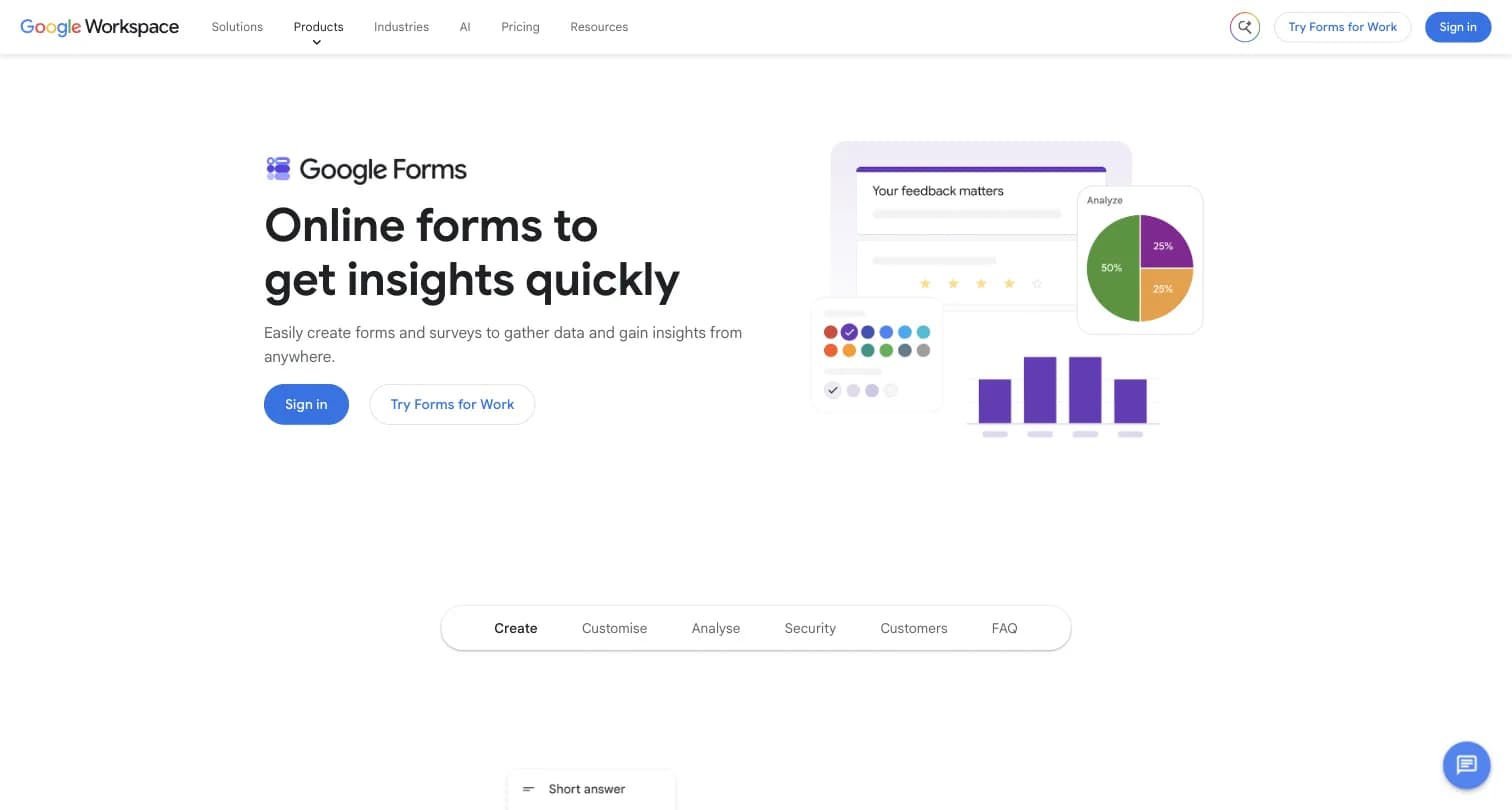
Captured August 15, 2026 from workspace.google.com/products/forms.
Google Forms is a free form and survey tool bundled into Google Workspace. It has no independent founding story or company, it's a product line inside Google, not a standalone business, which matters because there's no separate roadmap or pricing lever Google can pull the way a dedicated form vendor can.
What You Get for Free
Google Forms is free with any Google account, not necessarily a paid Workspace seat. It includes:
- Unlimited forms and unlimited responses
- 11-12 question types, including a rating scale
- 17 templates and drag-and-drop question building
- Basic conditional logic (show or skip a section based on an answer)
- Real-time response charts, with export to Google Sheets
Zapier's testing found a nice touch: Google Forms suggests the most appropriate answer type based on the question you type, and Google's Gemini AI (available to Workspace Labs users) can generate an entire form from a prompt.
Where Google Forms Is Bundled, Not Standalone
Google Forms itself has no price. If you want more storage, a custom business email, or admin controls alongside Forms, that means a Google Workspace seat: Business Starter at $7/user/month, Business Standard at $14/user/month, Business Plus at $22/user/month, or custom Enterprise pricing. None of these prices are Forms-specific, they're the cost of the entire Workspace suite.
Where Google Forms Falls Short
- No custom branding beyond a logo, background color, and font, forms tend to look "same-ish" across the web according to Zapier's own testing
- Only 11-12 question types and single-level branching logic, no calculated values or advanced skip logic
- No native payment collection or e-signature support without a third-party Workspace Marketplace add-on
- No "save as draft," leaving a form before submitting loses all entered answers, per FormNX's review
- No advanced analytics or reporting, and no GDPR-specific compliance tooling built into the form itself, per the same review, even though Google's underlying infrastructure carries broad compliance certifications
Jotform: More Power, at a Real Cost
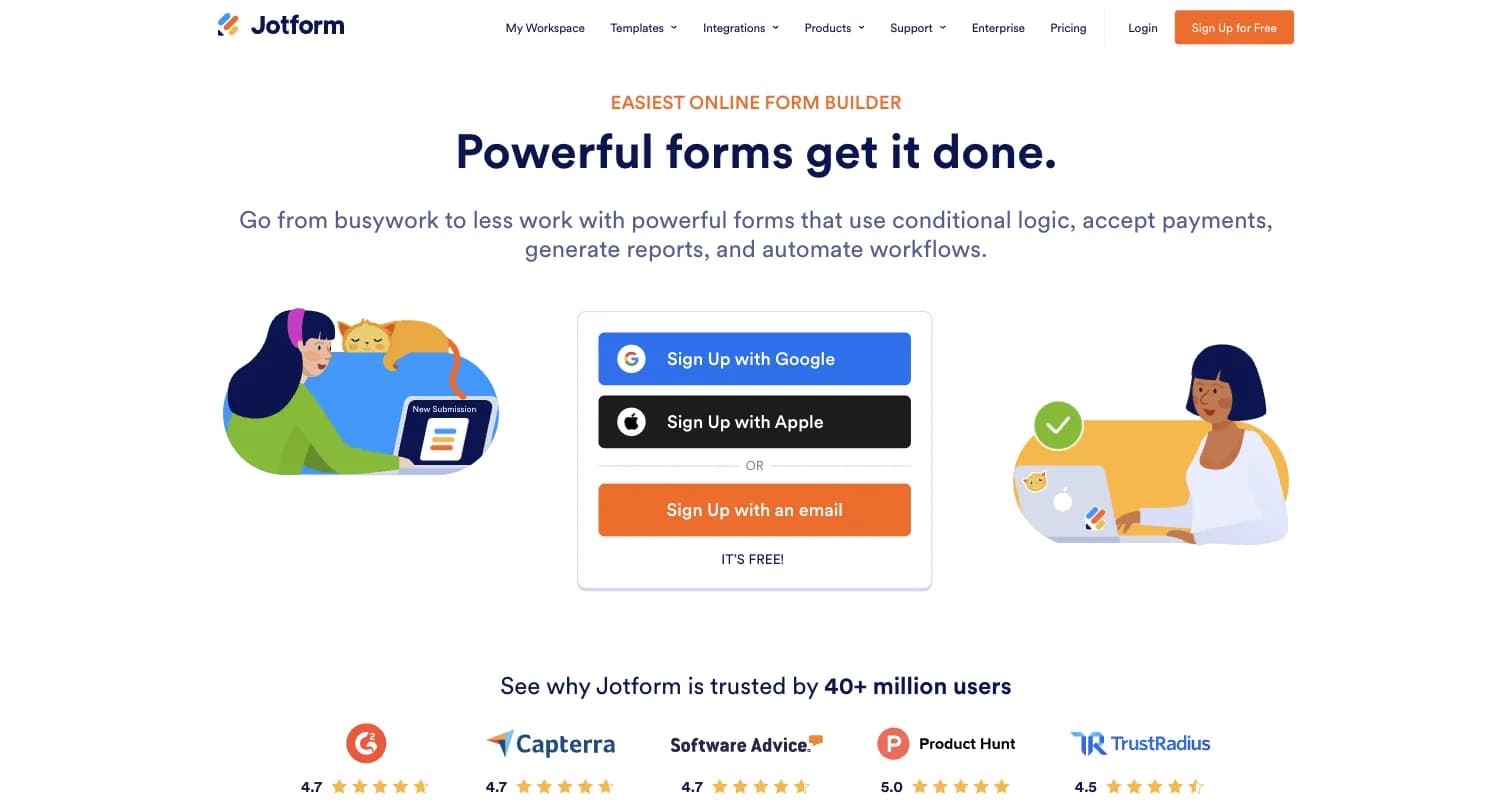
Captured August 15, 2026 from jotform.com.
Founder Aytekin Tank was, in his own words, "sick and tired of having to code online forms" and built Jotform as a faster, what-you-see-is-what-you-get form builder, launched in 2006. The company remained bootstrapped, with no outside funding, as it grew to 40M+ users, processing $2 billion in payments annually by 2026.
Jotform's Free Starter Plan
The free Starter plan includes 5 forms, 100 monthly submissions, 1 user, and 100 MB of storage, with Jotform branding included and HIPAA features unavailable. It's enough for a genuinely small, low-volume form, but a real operational workflow will hit that 100-submission cap fast.
Jotform's Paid Tiers
Above Starter sit three published tiers, plus a custom Enterprise plan:
| Plan | Price (billed annually) | Monthly Submissions | Key Features |
|---|---|---|---|
| Bronze | $34/month | 1,000 (25 forms) | 1 GB storage, 100,000 monthly form views, no branding, 100 monthly payment submissions |
| Silver | $39/month ("Best Value") | 2,500 (50 forms) | 10 GB storage, 1,000,000 monthly form views, no branding |
| Gold | $99/month | 10,000 (100 forms) | 100 GB storage, HIPAA-enabled features available, 1,000 monthly payment submissions |
| Enterprise | Custom | Unlimited forms and submissions | Multiuser platform, SSO, SLAs, data residency, custom branding and domain |
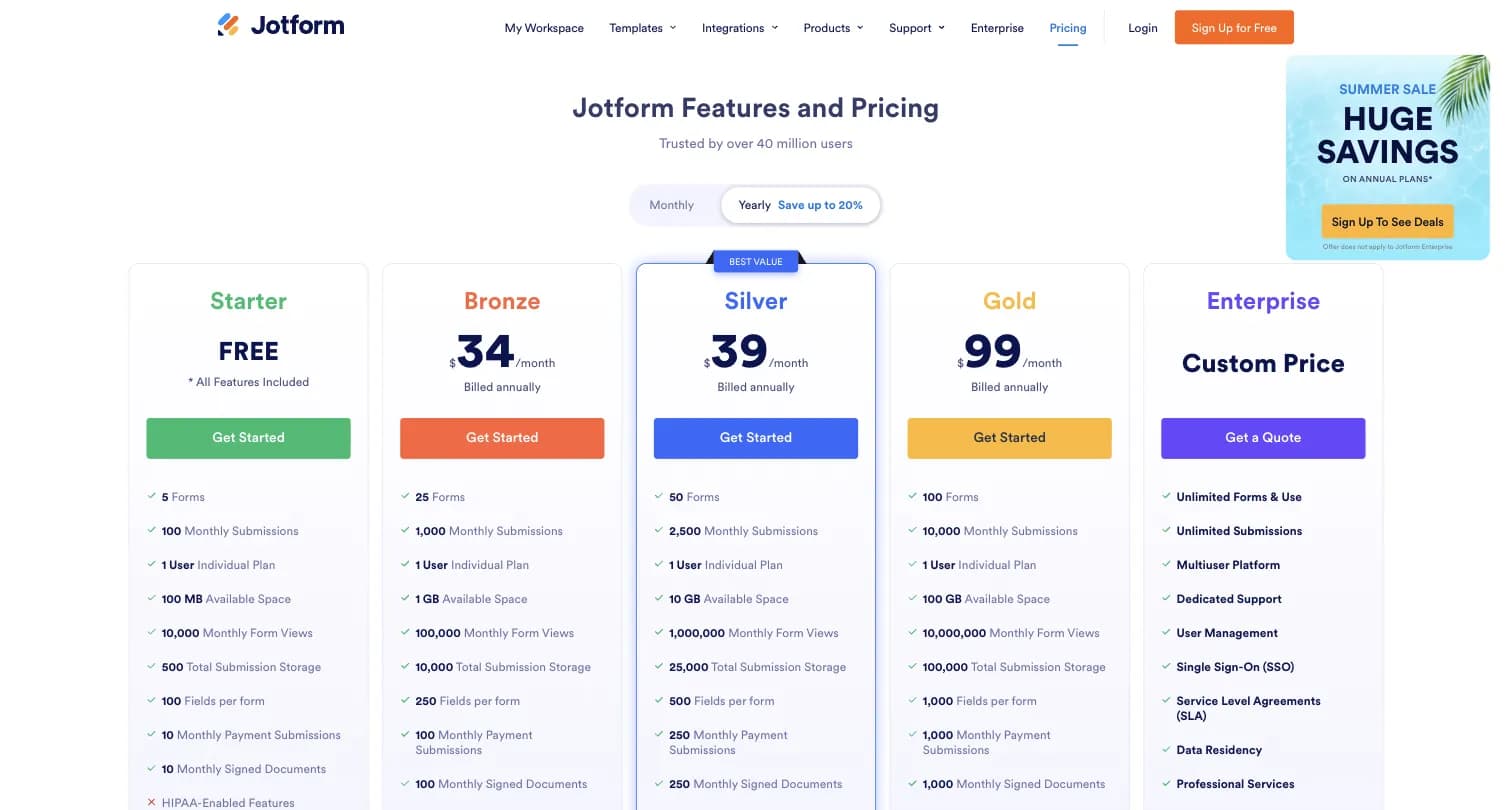
Captured August 15, 2026 from jotform.com/pricing.
Jotform also offers nonprofit and education discounts of up to 50%, but they're gated behind an application process rather than shown as a standard price on the pricing page.
Where Jotform Falls Short
- The page's cached metadata advertised plans "starting at $19/month" while the live on-page pricing table showed the cheapest paid plan (Bronze) at $34/month, a discrepancy worth double-checking directly before you budget
- Submission and form caps scale tightly with price, teams collecting real form volume are pushed from the free Starter tier into $34-99/month fast
- Every plan below Enterprise is limited to 1 user, so team collaboration on forms requires jumping straight to a custom-priced contract
- HIPAA-enabled features are gated to Gold ($99/month) and Enterprise only
- Reviewers on G2 note pricing "becomes restrictive at higher usage/submission volume" and that form loading can slow under complex conditional logic
Formbricks: An Open Feedback and Experience Management Suite
Formbricks isn't a third form builder competing on templates or widget counts. It's an open source feedback and experience management suite built around three things: feedback management, feedback analytics, and workflows and integrations, published transparently and included on every tier rather than upsold as add-ons.
Feedback Management. Formbricks unifies collection channels that neither Jotform nor Google Forms combine on one platform: website surveys that target specific visitors, in-app surveys that reach any user cohort inside your product, link surveys for broad distribution, and branded surveys embedded directly in email.
Feedback Analytics. Response data flows into one place regardless of channel. You can follow individual feedback trails or zoom out for the aggregate picture, track partial and dropped-off responses, and segment by custom attributes, capabilities neither Google Forms' basic charts nor Jotform's operational reporting tools (Tables, Inbox, Report Builder) are built around for a recurring feedback program.
Workflows and Integrations. Formbricks Workflows automate what happens after a response comes in, routing and acting on feedback without manual handling. On the integration side, Formbricks connects to Salesforce, HubSpot, Slack, Google Sheets, and Notion through webhooks and its open API, free on every tier, including the self-hosted Community Edition.
Formbricks Pricing
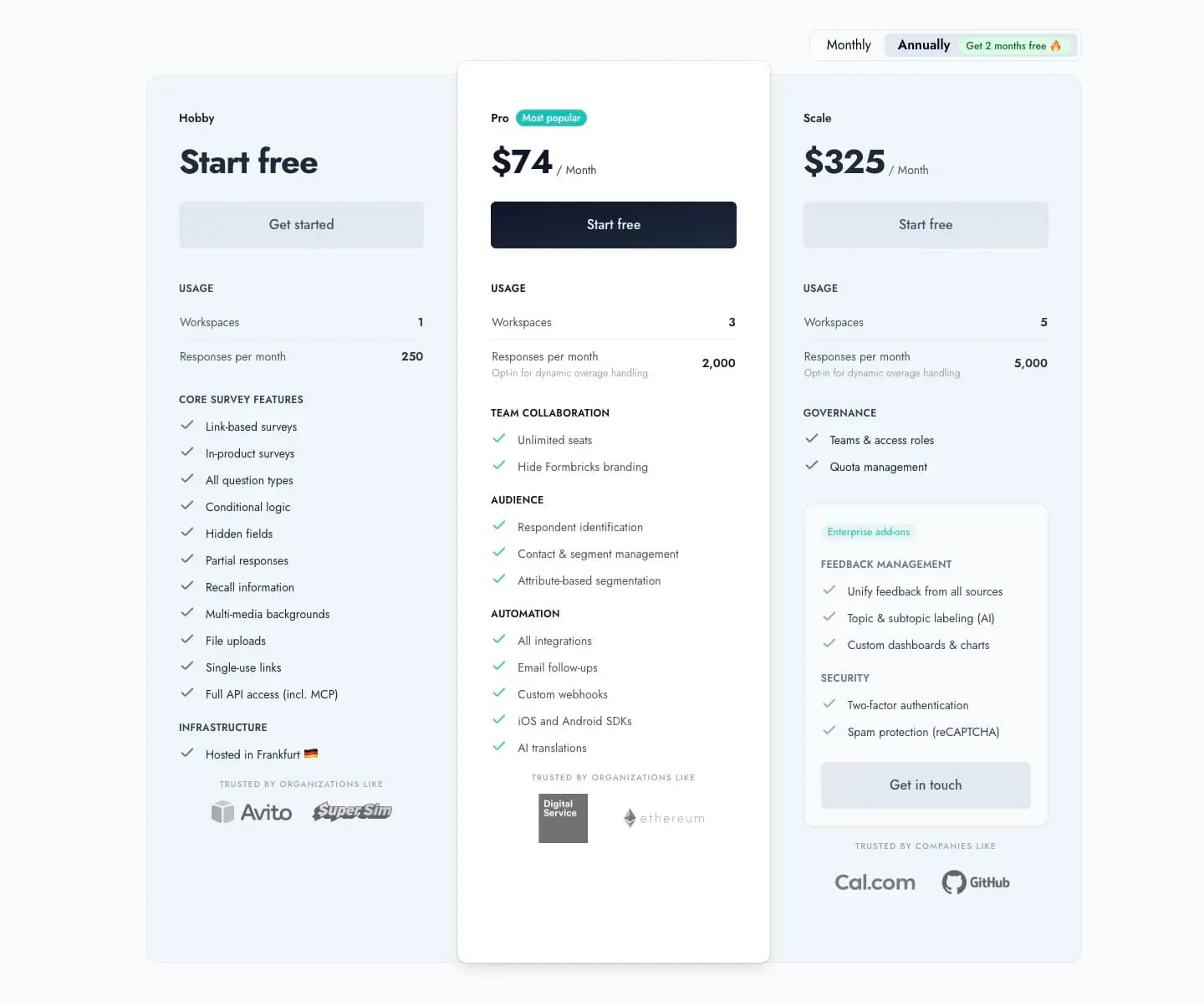
Captured August 16, 2026 from formbricks.com/pricing.
| Plan | Monthly Billing | Annual Billing | Responses/Month | Workspaces |
|---|---|---|---|---|
| Hobby | Free | Free | 250 | 1 |
| Pro | $89/month | $890/year (displayed as $74/mo) | 2,000 | 3 |
| Scale | $390/month | $3,900/year (displayed as $325/mo) | 5,000 | 5 |
Unlike Jotform's 1-user cap below Enterprise, Formbricks Pro includes unlimited seats. Unlike Google Forms' add-on-dependent payment collection, Formbricks isn't trying to be a payments or e-signature tool at all, it's built for structured feedback programs (NPS, CSAT, PMF surveys) that neither Jotform nor Google Forms has a dedicated layer for.
Formbricks Self-Hosting: Community Edition
The free, self-hosted Community Edition, licensed under AGPLv3, is where Formbricks diverges most sharply from both Jotform and Google Forms. Data never leaves your own infrastructure, there's no response cap, and even if you stop paying for Enterprise features, the Community Edition and your data remain accessible. Neither Jotform (data residency is Enterprise-only) nor Google Forms (Google's infrastructure only) offers an equivalent path at any price below a custom contract.
To be clear about fit: if what you actually need is payment collection, e-signatures, or a 20,000-template operational form builder, that's Jotform's territory, not Formbricks'. Formbricks is the better fit specifically for teams that have outgrown a one-off form and need an ongoing feedback program with analytics and automation behind it.
Side-by-Side Pricing
| Google Forms | Jotform | Formbricks | |
|---|---|---|---|
| Free tier | Unlimited responses, basic features, no branding | 100 submissions/month, 5 forms, 1 user | 250 responses/month, full API incl. MCP |
| Cheapest paid tier | No Forms-specific price (Workspace Business Starter $7/user/mo) | Bronze: $34/month, 1,000 submissions/month | Pro: $89/mo (or $890/yr annual) |
| Mid tier | Workspace Business Standard/Plus, $14-22/user/mo | Silver: $39/mo, Gold: $99/mo | Scale: $390/mo (or $3,900/yr annual) |
| Enterprise | Workspace Enterprise, custom | Custom, unlimited forms/submissions, SSO, data residency | Custom pricing, published contact path |
| Self-hosting | Not offered | Not offered below Enterprise | Free Community Edition, self-hosted |
| Feedback channels | Forms only | Forms only | Website, in-app, link, and email, unified |
Feature Value Breakdown
Ease of Use
Google Forms' Approach: Sign in with any Google account, pick from 17 templates or start blank, done in minutes. Zapier's testing rates this 5/5.
Jotform's Approach: Easy to get started with, but the sheer number of fields and widgets can be hard to navigate. Zapier rates this 4/5.
Formbricks' Approach: A no-code builder for standard survey creation, with developer-first depth (full API, SDKs, webhooks) available for teams that want to go further.
Value Verdict: Google Forms wins on raw setup speed for a simple form. Jotform trades some of that simplicity for a much deeper feature set underneath.
Power and Flexibility
Google Forms' Approach: Suitable for the vast majority of basic form needs, but you're limited to simple questions and single-level branching. Zapier rates this 3/5.
Jotform's Approach: 20+ basic fields and 100+ widgets, from countdown timers to calorie calculators, plus advanced conditional logic that can calculate values and personalize thank-you pages. Zapier rates this a full 5/5.
Formbricks' Approach: All standard question types plus attribute-based segmentation for targeting who sees a survey and when, built for feedback programs rather than operational form widgets.
Value Verdict: Jotform wins clearly on raw form-building power. Formbricks' "power" is oriented toward feedback targeting and analytics rather than form widgets.
Pricing Transparency and Value
Google Forms' Approach: Genuinely free, no tiers to compare, though "Forms pricing" is really "Workspace pricing" if you want more than the free experience. Zapier rates value for money 5/5.
Jotform's Approach: Free Starter tier caps out fast at 100 submissions/month, and there's a discrepancy between the pricing page's cached metadata ("starting at $19/month") and its live on-page table (Bronze at $34/month). Zapier rates value for money 4/5, citing that Jotform "just doesn't offer the same value as Google Forms" unless you need its extra features.
Formbricks' Approach: Every tier, Hobby through Scale, is priced and published on the site, with both monthly and annual billing shown up front and no metadata/on-page discrepancy found.
Value Verdict: Google Forms and Formbricks both publish clean, consistent numbers. Jotform's live pricing page had an internal inconsistency worth double-checking before you commit a budget line to it.
Payments, Signatures, and Compliance
Google Forms' Approach: No native payment collection or e-signature support, requires a third-party Workspace Marketplace add-on for either.
Jotform's Approach: Native integrations with Stripe, PayPal, Square, Venmo, and more, plus built-in e-signature collection and HIPAA-enabled features on Gold and Enterprise tiers.
Formbricks' Approach: Not a payments or e-signature platform, feedback collection and analytics are the focus, with SOC 2, GDPR, and CCPA compliance covering the data itself rather than transactional form use cases.
Value Verdict: Jotform wins decisively here. If your form needs to charge a customer or collect a legal signature, neither Google Forms nor Formbricks is built for that job.
Data Residency and Self-Hosting
Google Forms' Approach: Runs entirely on Google's infrastructure, no regional choice or self-hosting option at any tier.
Jotform's Approach: A dedicated "Local Data Residency" option exists, but it's positioned under Jotform Enterprise, not available on Bronze, Silver, or Gold.
Formbricks' Approach: A free, self-hosted Community Edition under AGPLv3 keeps data on your own infrastructure entirely, on every plan, not just a custom Enterprise contract.
Value Verdict: Formbricks wins clearly for any buyer where self-hosting or data residency is a hard requirement rather than an Enterprise-tier negotiation.
What Reviewers Say
Jotform holds a 4.7 rating across 5,424 reviews on G2, 4.7 across 2,918 reviews on Capterra, and 8.5/10 across 388 reviews on TrustRadius. Google Forms holds a 4.7 rating across 11,526 reviews on Capterra; it doesn't have a distinct G2 product page, requests to G2's Google Forms URL redirect to G2's general Survey Software category page instead.
| Google Forms | Jotform | |
|---|---|---|
| What reviewers like | Completely free and simple to use | Ease of use, large template library, integration with 200+ apps |
| What reviewers dislike | No custom branding, weak conditional logic, no payment integration, no e-signature, no save-as-draft | Pricing restrictive at higher volume, some advanced features gated to higher tiers, form loading can slow under complex logic |
Jotform's own comparison page cites a 4.7 G2 rating for itself against a 4.6 for "Google Workspace," worth noting as the vendor's own framing rather than an independent Google-Forms-specific score, since no such score exists on G2 directly.
Who Should Choose Which Platform
Choose Google Forms if:
- Your budget is $0 and you already use Google Workspace
- You're collecting internal feedback, RSVPs, or event sign-ups, not customer-facing forms with payments attached
- You don't need custom branding, e-signatures, or advanced conditional logic
- Unlimited free responses matter more than templates or widgets
Choose Jotform if:
- You need to collect payments or legally binding signatures directly on a form
- You want access to 20,000+ templates and 100+ widgets instead of 17 templates and 11 question types
- HIPAA-enabled intake forms matter and you can budget for the Gold tier ($99/month) or above
- You're comfortable with per-user limits below the custom-priced Enterprise tier
Choose Formbricks if:
- You want one platform for website, in-app, link, and email feedback instead of a one-off operational form
- You need feedback analytics (segmentation, drop-off tracking) and Workflows built in, not sold separately
- Self-hosting or data residency is a real requirement you don't want gated behind an Enterprise-only contract
- Your engineering team wants full API access, including MCP, free on every tier
Jotform vs Google Forms FAQ
Final Verdict
👍 Google Forms is the right call if your budget is $0, you already live inside Google Workspace, and your form needs are internal, low-stakes, or purely about collecting structured data (RSVPs, quizzes, sign-ups) rather than payments or legally binding signatures.
👍 Jotform is the right call if you need to collect payments or e-signatures directly on a form, want access to 20,000+ templates and advanced conditional logic, and you're willing to budget $34 to $99/month once you outgrow the free Starter tier's 100-submission cap.
👉 Formbricks is the better fit if you want one platform for website, in-app, link, and email feedback instead of a one-off operational form, and you want feedback analytics and Workflows built in from a published, monthly-or-annual price. The self-hosted Community Edition also gives you a data residency option that neither Jotform (Enterprise-only) nor Google Forms offers at any price.
The honest read: Google Forms and Jotform solve different problems at different price points, and picking between them usually comes down to whether you need payments and signatures or just a free, simple form. If neither answers the feedback-analytics or self-hosting question you came here with, see Formbricks' current pricing here.
Try Formbricks now