

By adding validation rules to your questions, you can improve data quality, reduce errors, and create a better survey experience.Documentation Index
Fetch the complete documentation index at: https://formbricks.com/docs/llms.txt
Use this file to discover all available pages before exploring further.
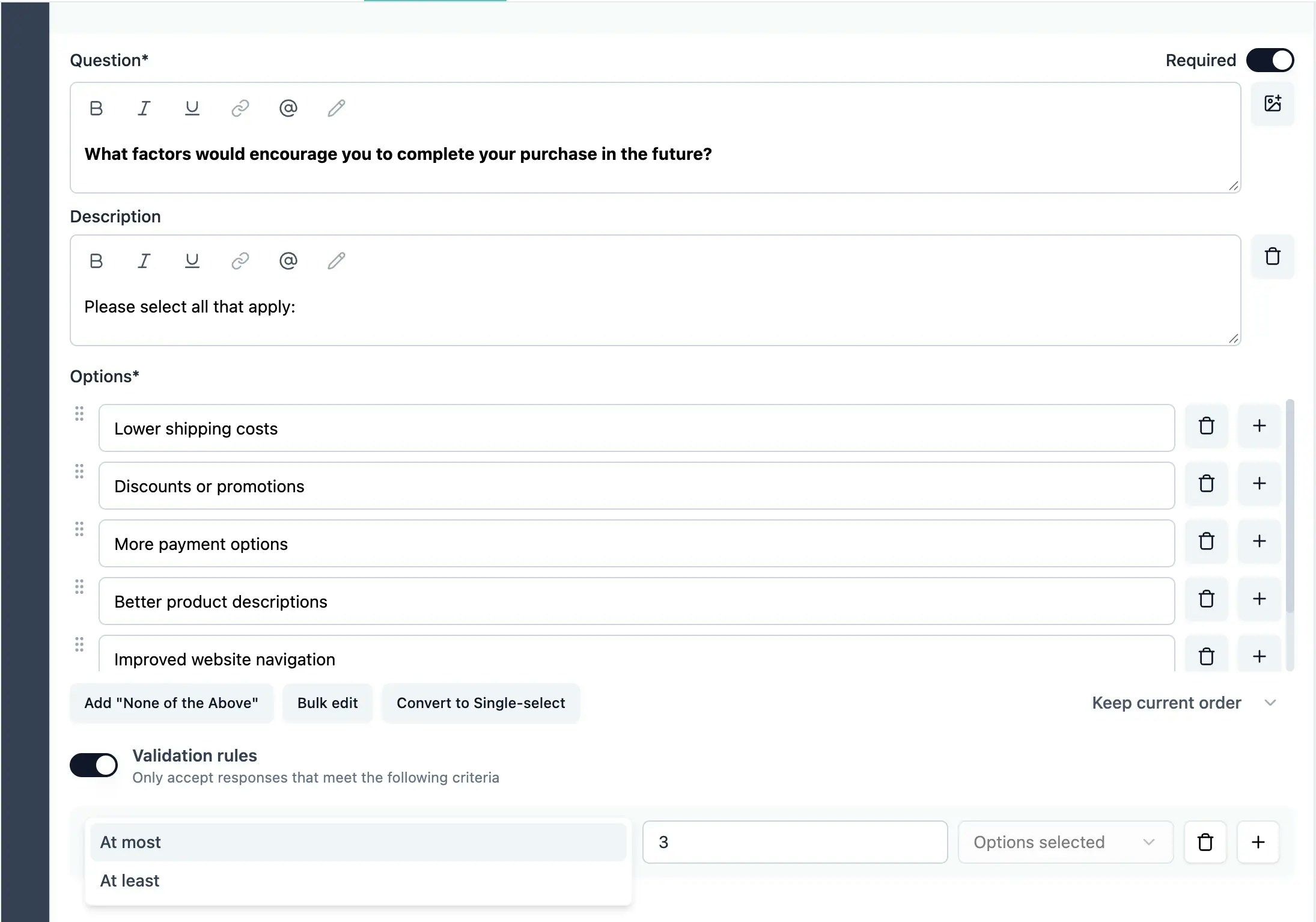
How Validation Rules Work
Validation rules are evaluated when a respondent submits their answer. If the answer doesn’t meet the validation criteria, an error message is displayed and the respondent must correct their input before proceeding. You can combine multiple validation rules using All are true or Any is true logic:- All are true: All rules must pass for the response to be valid
- Any is true: At least one rule must pass for the response to be valid
Available Validation Rules by Question Type
Free Text Questions
Free text questions support different validation rules based on the input type:Text Input Type
| Rule | Description | Example |
|---|---|---|
| At least (characters) | Requires at least N characters | At least 10 characters for detailed feedback |
| At most (characters) | Limits response to N characters | At most 500 characters for short answers |
| Matches Regex Pattern | Matches a regular expression pattern | Custom format validation |
| Is | Exact match required | Must equal “CONFIRM” |
| Is not | Must not match the value | Cannot be “N/A” |
| Contains | Must include the substring | Must contain “@company.com” |
| Does not contain | Must not include the substring | Cannot contain profanity |
Email Input Type
Email input automatically validates email format. Additional rules available:- At least, At most (characters)
- Matches Regex Pattern, Is, Is not
- Contains, Does not contain
URL Input Type
URL input automatically validates URL format. Additional rules available:- At least, At most (characters)
- Matches Regex Pattern, Is, Is not
- Contains, Does not contain
Phone Input Type
Phone input automatically validates phone number format. Additional rules available:- At least, At most (characters)
- Matches Regex Pattern, Is, Is not
- Contains, Does not contain
Number Input Type
| Rule | Description | Example |
|---|---|---|
| At least | Number must be at least N | Age must be at least 18 |
| At most | Number cannot exceed N | Quantity at most 100 |
| Is | Number must equal N | Quantity is 1 |
| Is not | Number must not equal N | Cannot be 0 |
Multiple Choice (Multi-Select) Questions
| Rule | Description | Example |
|---|---|---|
| At least (options selected) | Require at least N selections | At least 2 options selected |
| At most (options selected) | Limit to N selections | At most 3 options selected |
Picture Selection Questions
| Rule | Description | Example |
|---|---|---|
| At least (options selected) | Require at least N pictures | At least 1 design selected |
| At most (options selected) | Limit to N pictures | At most 2 favorites selected |
Date Questions
| Rule | Description | Example |
|---|---|---|
| Is later than | Date must be after specified date | Must be after today |
| Is earlier than | Date must be before specified date | Must be before Dec 31, 2025 |
| Is between | Date must be within range | Between Jan 1 and Dec 31 |
| Is not between | Date must be outside range | Cannot be during holidays |
Date values should be specified in YYYY-MM-DD format (e.g., 2025-01-15).
Matrix Questions
| Rule | Description | Example |
|---|---|---|
| Minimum rows answered | Require at least N rows to be answered | Answer at least 3 rows |
| Answer all rows | All rows must have a selection | Complete the entire matrix |
Ranking Questions
| Rule | Description | Example |
|---|---|---|
| Minimum options ranked | Require at least N items to be ranked | Rank your top 3 |
| Rank all options | All options must be ranked | Rank all 5 items |
File Upload Questions
| Rule | Description | Example |
|---|---|---|
| File extension is | Only allow specific file types | Only .pdf, .docx allowed |
| File extension is not | Block specific file types | No .exe files |
File size limits are configured separately in the question settings using the “Maximum file size” option.
Address Questions
Each address field (Address Line 1, Address Line 2, City, State, ZIP, Country) can have its own validation rules:- At least, At most (characters)
- Matches Regex Pattern
- Is, Is not
- Contains, Does not contain
Contact Info Questions
Each contact field can have specific validation rules: First Name, Last Name, Company:- At least, At most (characters)
- Matches Regex Pattern, Is, Is not
- Contains, Does not contain
Adding Validation Rules
Navigate to Validation Rules
Scroll down to find the “Validation Rules” section and click to expand it.
Configure the Rule
Select the rule type from the dropdown and enter the required value (if applicable).
Set Logic (Optional)
If you have multiple rules, choose whether they should be combined with “All are true” or “Any is true” logic.
Error Messages
Formbricks automatically generates user-friendly error messages based on your validation rules. Error messages are displayed below the input field when validation fails. Example error messages:- “Must be at least 10 characters”
- “Must be a valid email address”
- “Please select at least 2 options”
- “Date must be after 2025-01-01”
Multi-Language Support
Validation rules work with multi-language surveys. Error messages are automatically displayed in the respondent’s selected language.Combining Multiple Rules
When using multiple validation rules: All are true: Use when all conditions must be met.- Example: Text must be at least 10 characters AND contain “@email.com”
- Example: Date is earlier than 2025-01-01 OR is later than 2025-12-31