> ## Documentation Index
> Fetch the complete documentation index at: https://formbricks.com/docs/llms.txt
> Use this file to discover all available pages before exploring further.
# Customer Satisfaction (CSAT)
> CSAT questions ask how satisfied someone was with a specific interaction, on a fixed five-point scale. Use it right after the thing you are asking about.
CSAT measures satisfaction with one specific experience — an order, a support conversation, an onboarding step — rather than a feeling about your company as a whole. Ask it while the interaction is still fresh.
CSAT always uses a **five-point** scale. If you need a different range, use a [Rating](/docs/surveys/question-type/rating) question instead.
## Elements
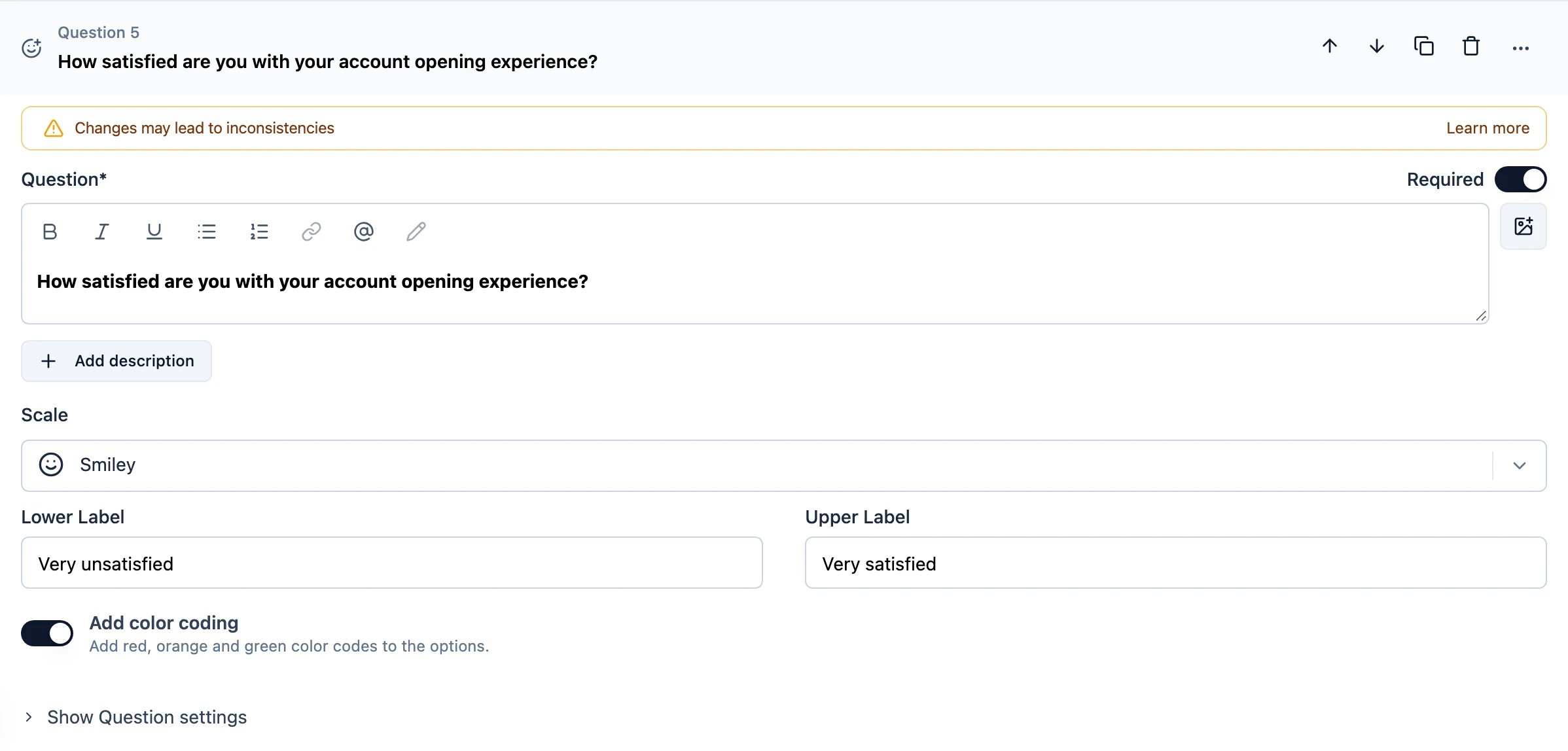 ### Title
Name the interaction you are asking about, not the company. "How satisfied were you with this support conversation?" gets a more useful answer than "How satisfied are you with us?".
### Description
Provide an optional description with further instructions.
### Scale
Choose how the five points are displayed:
| Scale | When to use |
| ---------- | -------------------------------------------------------------------------------------------------------- |
| **Smiley** | Fastest to answer, and reads the same in every language. The default choice for consumer-facing surveys. |
| **Number** | When you want respondents to think of the answer as a score, or when smileys clash with a formal tone. |
| **Star** | Familiar from review sites, so it reads as a rating of quality. |
### Labels
Add labels for the lower and upper ends of the scale, for example "Very unsatisfied" and "Very satisfied". Both are optional, but a scale without them leaves the respondent guessing which end is good.
### Add color coding
Adds red, orange and green colour codes to the options, so the scale reads at a glance.
## CSAT and the rating question
A CSAT question and a five-point [Rating](/docs/surveys/question-type/rating) question look similar in a survey. The difference is what they are for:
* **CSAT** is a standard metric with a fixed scale, so scores are comparable across surveys and over time.
* **Rating** is flexible — you choose the range — which makes it better for one-off questions and worse for tracking a trend.
## How to choose between CSAT, NPS and CES
* **CSAT** — how did *this interaction* go? Ask straight after it.
* **[NPS](/docs/surveys/question-type/net-promoter-score)** — how do you feel about *the company*? Ask periodically, not after a single event.
* **[CES](/docs/surveys/question-type/ces)** — how much *effort* did this take? Ask after a task the customer had to complete.
### Title
Name the interaction you are asking about, not the company. "How satisfied were you with this support conversation?" gets a more useful answer than "How satisfied are you with us?".
### Description
Provide an optional description with further instructions.
### Scale
Choose how the five points are displayed:
| Scale | When to use |
| ---------- | -------------------------------------------------------------------------------------------------------- |
| **Smiley** | Fastest to answer, and reads the same in every language. The default choice for consumer-facing surveys. |
| **Number** | When you want respondents to think of the answer as a score, or when smileys clash with a formal tone. |
| **Star** | Familiar from review sites, so it reads as a rating of quality. |
### Labels
Add labels for the lower and upper ends of the scale, for example "Very unsatisfied" and "Very satisfied". Both are optional, but a scale without them leaves the respondent guessing which end is good.
### Add color coding
Adds red, orange and green colour codes to the options, so the scale reads at a glance.
## CSAT and the rating question
A CSAT question and a five-point [Rating](/docs/surveys/question-type/rating) question look similar in a survey. The difference is what they are for:
* **CSAT** is a standard metric with a fixed scale, so scores are comparable across surveys and over time.
* **Rating** is flexible — you choose the range — which makes it better for one-off questions and worse for tracking a trend.
## How to choose between CSAT, NPS and CES
* **CSAT** — how did *this interaction* go? Ask straight after it.
* **[NPS](/docs/surveys/question-type/net-promoter-score)** — how do you feel about *the company*? Ask periodically, not after a single event.
* **[CES](/docs/surveys/question-type/ces)** — how much *effort* did this take? Ask after a task the customer had to complete.