> ## Documentation Index
> Fetch the complete documentation index at: https://formbricks.com/docs/llms.txt
> Use this file to discover all available pages before exploring further.
# Schedule a Survey
> Publish a survey on a future date and close it on another, so a survey runs for a fixed window without anyone having to remember to switch it on or off.
A survey can open and close on dates you set in advance. Use it when the window matters — a quarterly pulse, a survey that should not start before a launch, or a panel you want to stop collecting after a deadline.
Both settings are independent. You can schedule only the start, only the end, or both.
## Setting the dates
1. Open the survey in the editor and go to the **Settings** tab.
2. Open **Response Options**.
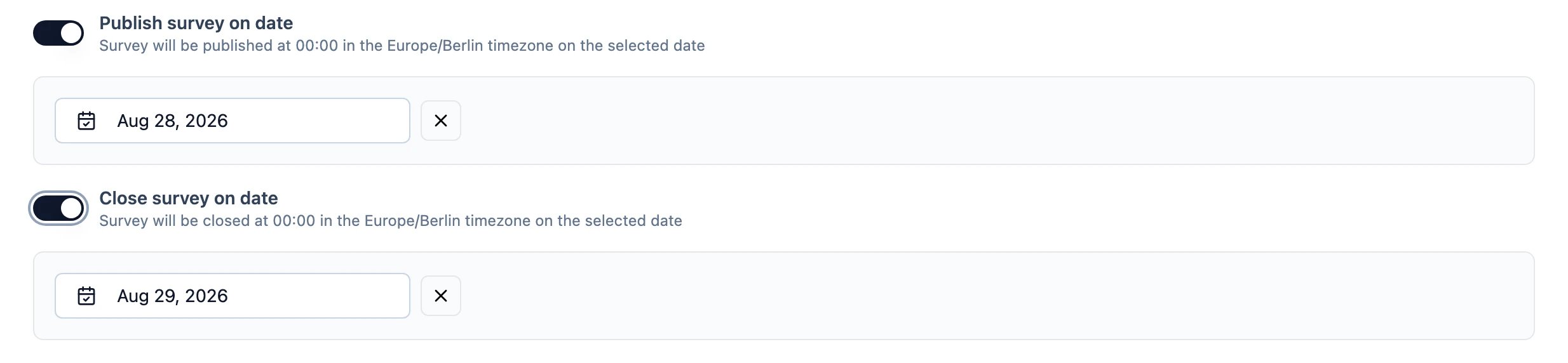
3. Turn on **Publish survey on date**, **Close survey on date**, or both, and pick a date for each.
 ## What the dates mean
Both actions happen at a fixed time of day, in a fixed time zone, on the date you choose — not at the moment you set them.
* Before its publish date, the survey shows as **Scheduled** in the survey list and the status dropdown. It is a paused survey with a future publish date rather than a status of its own, so pausing and scheduling are the same underlying state.
* A survey that reaches its close date stops accepting responses, exactly as if you had closed it by hand. Existing responses are untouched.
* Removing a date with the **×** next to it cancels that half of the schedule.
The time of day and the time zone are properties of the Formbricks instance, not of the survey. The editor tells you which apply — for example "Survey will be published at 00:00 in the Europe/Berlin timezone on the selected date".
## Self-hosting
Self-hosted instances can change when scheduled surveys open and close:
| Variable | What it does | Default |
| -------------------------------- | ------------------------------------------------------- | --------------- |
| `SURVEY_SCHEDULING_TIME_ZONE` | The IANA time zone the scheduled time is interpreted in | `Europe/Berlin` |
| `SURVEY_SCHEDULING_LOCAL_HOUR` | Hour of day, 0–23 | `0` |
| `SURVEY_SCHEDULING_LOCAL_MINUTE` | Minute of the hour, 0–59 | `0` |
Set them to match the time zone your respondents live in, so "closes on the 30th" means what your team means by it. The editor's summary text updates to show the values in force.
Scheduling depends on the job runner. See [Job Runner](/docs/self-hosting/configuration/job-runner) if scheduled surveys are not opening or closing on time.
## What the dates mean
Both actions happen at a fixed time of day, in a fixed time zone, on the date you choose — not at the moment you set them.
* Before its publish date, the survey shows as **Scheduled** in the survey list and the status dropdown. It is a paused survey with a future publish date rather than a status of its own, so pausing and scheduling are the same underlying state.
* A survey that reaches its close date stops accepting responses, exactly as if you had closed it by hand. Existing responses are untouched.
* Removing a date with the **×** next to it cancels that half of the schedule.
The time of day and the time zone are properties of the Formbricks instance, not of the survey. The editor tells you which apply — for example "Survey will be published at 00:00 in the Europe/Berlin timezone on the selected date".
## Self-hosting
Self-hosted instances can change when scheduled surveys open and close:
| Variable | What it does | Default |
| -------------------------------- | ------------------------------------------------------- | --------------- |
| `SURVEY_SCHEDULING_TIME_ZONE` | The IANA time zone the scheduled time is interpreted in | `Europe/Berlin` |
| `SURVEY_SCHEDULING_LOCAL_HOUR` | Hour of day, 0–23 | `0` |
| `SURVEY_SCHEDULING_LOCAL_MINUTE` | Minute of the hour, 0–59 | `0` |
Set them to match the time zone your respondents live in, so "closes on the 30th" means what your team means by it. The editor's summary text updates to show the values in force.
Scheduling depends on the job runner. See [Job Runner](/docs/self-hosting/configuration/job-runner) if scheduled surveys are not opening or closing on time.