> ## Documentation Index
> Fetch the complete documentation index at: https://formbricks.com/docs/llms.txt
> Use this file to discover all available pages before exploring further.
# Migrate from Qualtrics
> Import a Qualtrics survey export (.qsf) as a draft survey, with its questions, pages, languages and piped text. Logic is listed in a report for you to rebuild.
Formbricks turns the `.qsf` file Qualtrics exports into a draft survey. Formbricks AI decides which Formbricks question type fits each Qualtrics question; every question text, option and translation is copied from your file, never written by the AI. Logic is not imported: the import report lists every rule, so you can rebuild it in the editor.
The Qualtrics import uses Formbricks AI, which is part of the [Enterprise
Edition](/docs/self-hosting/advanced/license). See [What the import needs](#what-the-import-needs).
## Before you export
Questions that are not in the survey flow, such as the ones in the **Trash / Unused Questions** block, are
skipped. Move anything you still need into the flow first.
In Qualtrics, open **Tools → Import/Export → Export Survey** and save the `.qsf` file. One file holds one
survey.
## Import into Formbricks
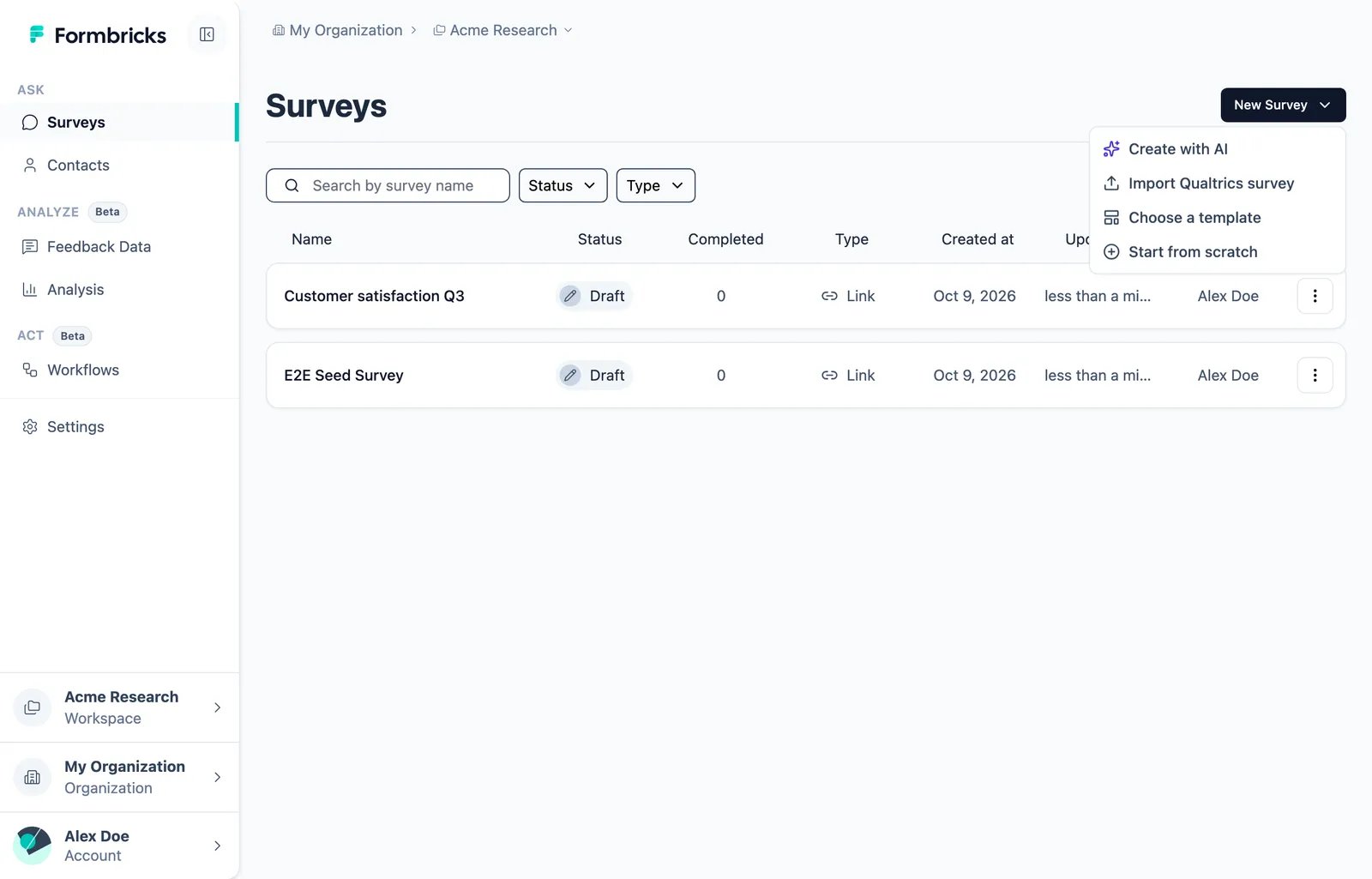
Go to **Surveys**, open the **New Survey** menu and choose **Import Qualtrics survey**. The templates page has
the same option as a card.
 Drop the `.qsf` file into the dialog, or click to choose it. The import takes from a few seconds to about two
minutes for a large survey. You can stop it at any time.
The review shows every imported question, a summary of the survey and the **Import report**. The report lists
everything that was left out or changed. It opens by itself when it has warnings.
Drop the `.qsf` file into the dialog, or click to choose it. The import takes from a few seconds to about two
minutes for a large survey. You can stop it at any time.
The review shows every imported question, a summary of the survey and the **Import report**. The report lists
everything that was left out or changed. It opens by itself when it has warnings.
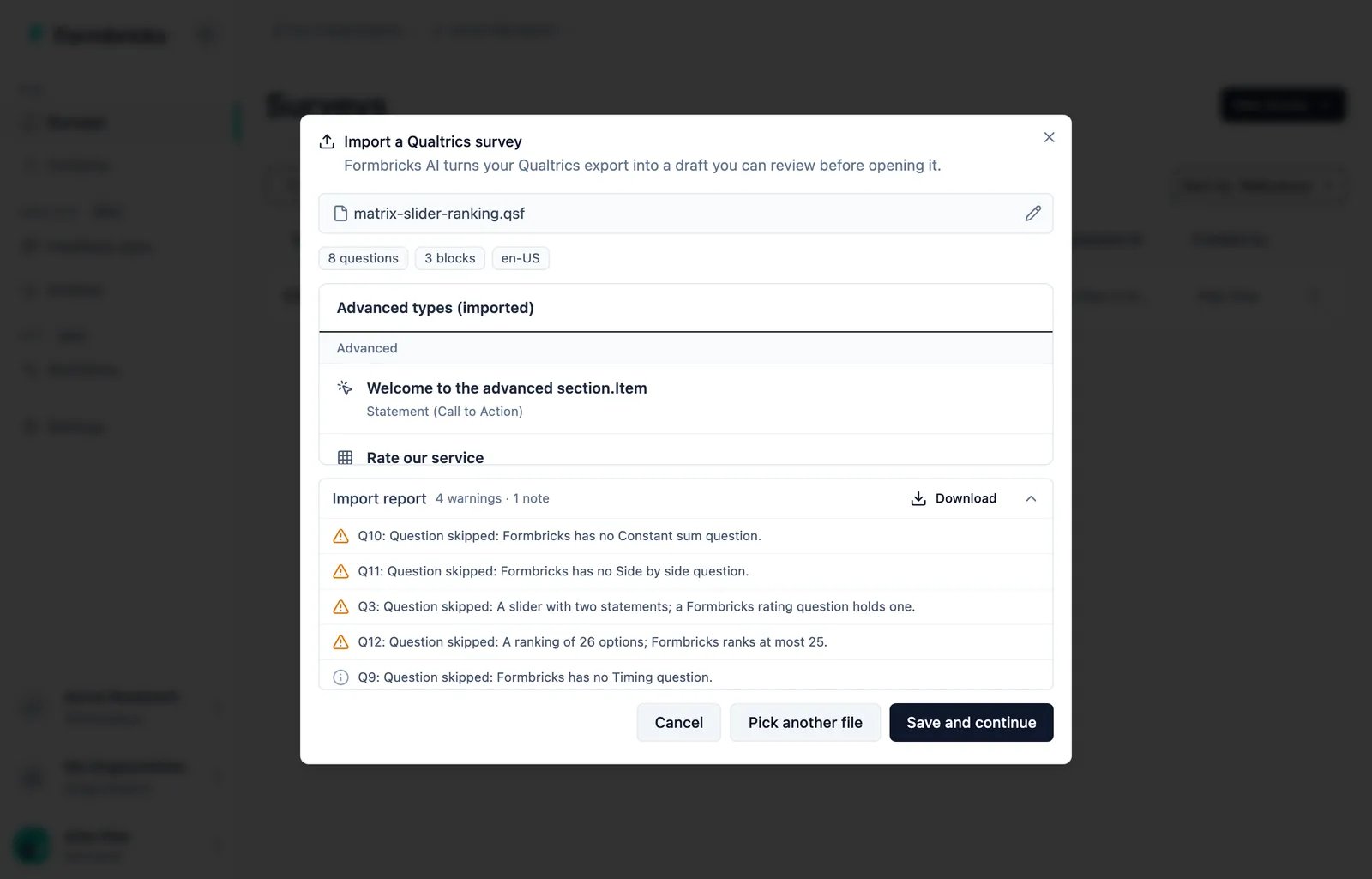 Click **Save and continue**. The survey is created as a draft and opens in the editor. Nothing is published.
The import report is only shown in the dialog. Click **Download** on the report before you click **Save and
continue**, so you keep the logic rules you need to rebuild.
## What comes across
| Qualtrics | Formbricks |
| - | - |
| Multiple choice, single answer | Single select, shown as a dropdown for a dropdown list |
| Multiple choice, multiple answers | Multi select |
| A single choice such as "I agree" | Consent |
| A choice with a text entry box | "Other" option |
| An exclusive choice of a multiple-answer question | "None of the above" option |
| NPS | Net Promoter Score |
| Text entry (single line, multi line, essay) | Free text, with the input type from its validation (email, number, phone, URL) |
| Text entry with date validation | Date |
| Text entry form with name, email, phone or company fields | Contact info |
| Matrix table | Matrix: statements as rows, scale points as columns |
| Slider with one statement, or star rating | Rating |
| Satisfaction or effort scale | CSAT or CES |
| Rank order, up to 25 options | Ranking |
| Descriptive text | Statement (call to action) |
| File upload | File upload |
| Pages | Blocks, one per page |
| Translations | Survey languages |
| Embedded data fields | Hidden fields |
| Piped text from an earlier question or an embedded data field | [Recall](/docs/surveys/general-features/recall) |
| Force response | Required |
| Randomized choices | Shuffled options |
| End-of-survey message, or a redirect URL | Ending card, or a redirect ending |
A few things change on the way, and each change is in the report:
* A matrix that takes several answers per row becomes a matrix with one answer per row.
* A Formbricks rating has 3, 4, 5, 6, 7 or 10 points. A slider of another size gets the next size up, at most 10.
* Embedded data names that are not valid hidden field IDs are renamed, for example `Store-Name` to `store_name`.
* Duplicate option labels are numbered, for example `N/A` and `N/A (2)`.
* A recall shows `...` when the recalled answer is empty. Set your own fallback in the editor.
* A redirect URL needs a plan that allows external links. Without one, the redirect is removed.
## What does not come across
Everything below is listed in the import report, next to the question it belongs to.
* **Logic.** Skip logic, display logic, branches and randomizers are not imported. Each rule is described in a sentence, so you can rebuild it with [conditional logic](/docs/surveys/general-features/conditional-logic).
* **Question types Formbricks does not have.** Constant sum, side by side, heat map, hot spot, drill down, pick group and rank, highlight, signature, drawing and gap analysis. Timing, meta info and captcha questions are also skipped.
* **Other piped text,** such as dates or loop and merge fields.
* **Images, scripts and text colors** in question texts. Bold, italics and links are kept.
* **End-of-survey messages from the Message Library.** The export only holds a reference to them, so the survey gets a default ending instead.
* **Quotas, scoring and survey options** such as the back button or the progress bar. Set them up in the editor.
## Languages
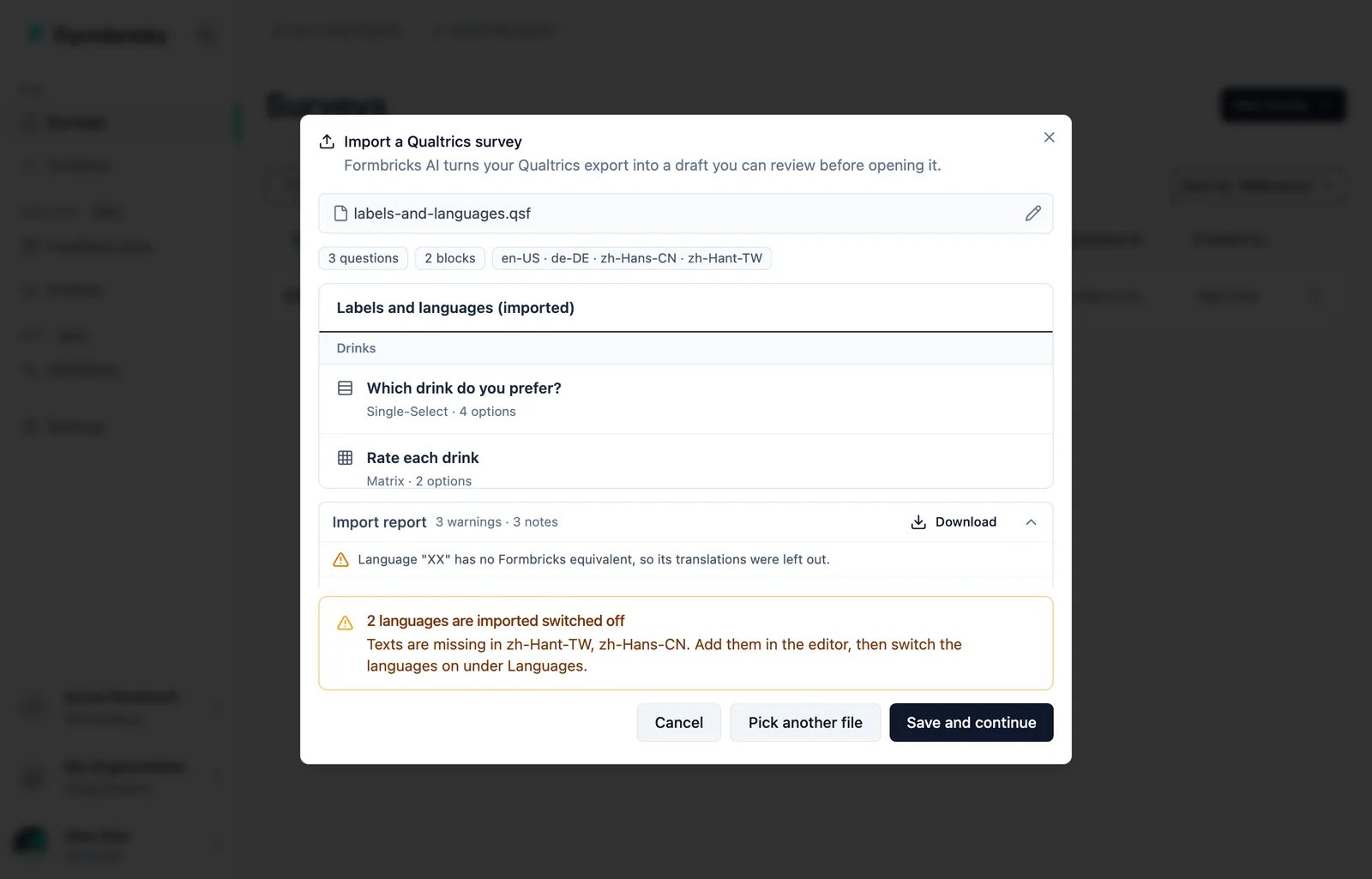
Each Qualtrics language becomes a survey language, with a region code: `EN` becomes `en-US`, `DE` becomes `de-DE` and `ZH-S` becomes `zh-Hans-CN`. A language Formbricks does not support is left out.
A language with missing texts is imported switched off. The review names it, and the missing texts stay empty, never filled with another language. Add them in the editor, then switch the language on under **Languages**.
Click **Save and continue**. The survey is created as a draft and opens in the editor. Nothing is published.
The import report is only shown in the dialog. Click **Download** on the report before you click **Save and
continue**, so you keep the logic rules you need to rebuild.
## What comes across
| Qualtrics | Formbricks |
| - | - |
| Multiple choice, single answer | Single select, shown as a dropdown for a dropdown list |
| Multiple choice, multiple answers | Multi select |
| A single choice such as "I agree" | Consent |
| A choice with a text entry box | "Other" option |
| An exclusive choice of a multiple-answer question | "None of the above" option |
| NPS | Net Promoter Score |
| Text entry (single line, multi line, essay) | Free text, with the input type from its validation (email, number, phone, URL) |
| Text entry with date validation | Date |
| Text entry form with name, email, phone or company fields | Contact info |
| Matrix table | Matrix: statements as rows, scale points as columns |
| Slider with one statement, or star rating | Rating |
| Satisfaction or effort scale | CSAT or CES |
| Rank order, up to 25 options | Ranking |
| Descriptive text | Statement (call to action) |
| File upload | File upload |
| Pages | Blocks, one per page |
| Translations | Survey languages |
| Embedded data fields | Hidden fields |
| Piped text from an earlier question or an embedded data field | [Recall](/docs/surveys/general-features/recall) |
| Force response | Required |
| Randomized choices | Shuffled options |
| End-of-survey message, or a redirect URL | Ending card, or a redirect ending |
A few things change on the way, and each change is in the report:
* A matrix that takes several answers per row becomes a matrix with one answer per row.
* A Formbricks rating has 3, 4, 5, 6, 7 or 10 points. A slider of another size gets the next size up, at most 10.
* Embedded data names that are not valid hidden field IDs are renamed, for example `Store-Name` to `store_name`.
* Duplicate option labels are numbered, for example `N/A` and `N/A (2)`.
* A recall shows `...` when the recalled answer is empty. Set your own fallback in the editor.
* A redirect URL needs a plan that allows external links. Without one, the redirect is removed.
## What does not come across
Everything below is listed in the import report, next to the question it belongs to.
* **Logic.** Skip logic, display logic, branches and randomizers are not imported. Each rule is described in a sentence, so you can rebuild it with [conditional logic](/docs/surveys/general-features/conditional-logic).
* **Question types Formbricks does not have.** Constant sum, side by side, heat map, hot spot, drill down, pick group and rank, highlight, signature, drawing and gap analysis. Timing, meta info and captcha questions are also skipped.
* **Other piped text,** such as dates or loop and merge fields.
* **Images, scripts and text colors** in question texts. Bold, italics and links are kept.
* **End-of-survey messages from the Message Library.** The export only holds a reference to them, so the survey gets a default ending instead.
* **Quotas, scoring and survey options** such as the back button or the progress bar. Set them up in the editor.
## Languages
Each Qualtrics language becomes a survey language, with a region code: `EN` becomes `en-US`, `DE` becomes `de-DE` and `ZH-S` becomes `zh-Hans-CN`. A language Formbricks does not support is left out.
A language with missing texts is imported switched off. The review names it, and the missing texts stay empty, never filled with another language. Add them in the editor, then switch the language on under **Languages**.
 Qualtrics exports do not include translations of the end-of-survey message. In other languages, the ending shows the Formbricks thank-you message in that language, or the default language's text if Formbricks has none. The report names those languages.
## After the import
1. Work through the report from the top.
2. Rebuild the logic. The report describes each rule.
3. Add any missing translations, then switch those languages on.
4. Check recall fallbacks, styling and survey settings.
5. For app or website surveys, add triggers.
6. Preview the survey, then publish.
## What the import needs
* **Your plan:** on Formbricks Cloud, a plan with AI. Self-hosted instances need an [Enterprise license](/docs/self-hosting/advanced/license).
* **The organization's AI switch:** **Settings → Organization → General → Smart functionality (AI)**. Only Owners and Managers can turn it on.
* **An AI provider** on self-hosted instances. See [AI Features](/docs/self-hosting/configuration/ai-features).
Turning on the AI switch is your consent to send survey content to the AI provider. The import sends your question texts, options and logic, never your responses. See [AI Features](/docs/platform/features/ai-features) for how AI is hosted.
## Limits
* One survey per file, up to 15 MB.
* Up to 200 questions, 200 options per question, 50 languages and 200 embedded data fields. Extra embedded data fields are left out and reported.
* If the survey is too large to save in one piece, the import leaves out the last languages, then the last questions, and reports each.
* One import at a time per user.
## Self-hosting: proxy body size
The import uploads the whole file in one request, up to about 16 MB. If a reverse proxy sits in front of Formbricks, allow request bodies of at least 16 MB on `/api/internal/surveys/import/stream`. nginx allows 1 MB by default:
```nginx theme={null}
location /api/internal/surveys/import/stream {
client_max_body_size 16m;
proxy_pass http://formbricks;
}
```
This documentation is built and hosted on [Mintlify](https://mintlify.com), a developer documentation platform.
Qualtrics exports do not include translations of the end-of-survey message. In other languages, the ending shows the Formbricks thank-you message in that language, or the default language's text if Formbricks has none. The report names those languages.
## After the import
1. Work through the report from the top.
2. Rebuild the logic. The report describes each rule.
3. Add any missing translations, then switch those languages on.
4. Check recall fallbacks, styling and survey settings.
5. For app or website surveys, add triggers.
6. Preview the survey, then publish.
## What the import needs
* **Your plan:** on Formbricks Cloud, a plan with AI. Self-hosted instances need an [Enterprise license](/docs/self-hosting/advanced/license).
* **The organization's AI switch:** **Settings → Organization → General → Smart functionality (AI)**. Only Owners and Managers can turn it on.
* **An AI provider** on self-hosted instances. See [AI Features](/docs/self-hosting/configuration/ai-features).
Turning on the AI switch is your consent to send survey content to the AI provider. The import sends your question texts, options and logic, never your responses. See [AI Features](/docs/platform/features/ai-features) for how AI is hosted.
## Limits
* One survey per file, up to 15 MB.
* Up to 200 questions, 200 options per question, 50 languages and 200 embedded data fields. Extra embedded data fields are left out and reported.
* If the survey is too large to save in one piece, the import leaves out the last languages, then the last questions, and reports each.
* One import at a time per user.
## Self-hosting: proxy body size
The import uploads the whole file in one request, up to about 16 MB. If a reverse proxy sits in front of Formbricks, allow request bodies of at least 16 MB on `/api/internal/surveys/import/stream`. nginx allows 1 MB by default:
```nginx theme={null}
location /api/internal/surveys/import/stream {
client_max_body_size 16m;
proxy_pass http://formbricks;
}
```
This documentation is built and hosted on [Mintlify](https://mintlify.com), a developer documentation platform.